Xây dựng API backend quản lý Car bằng server nodejs
5 chương · 21 bài
Mục lục
- Tổng quan
- Cấu hình chạy server node js
- cài đặt Redis-server trên Windows
- Cài đặt mongorestore trên window
- Cấu hình file swagger.json
- Xây dựng các route api 2 bài
- Xây dựng các bảng car và carcategory 2 bài
- Xây dựng các models 4 bài
- Thêm table cars và carcategories vào db
- Xây dựng các controller 2 bài
- Tạo view view.json.js cho carcategories
- Xây dựng các view json 2 bài
- Kiểm tra version của app và kiểm tra version của app server node
- Hoàn thành
Tổng quan
Trong phần dựng api này chúng ta sẽ làm đầy đủ chức năng, thêm sửa, xóa cho api car
Các api sau:
1.Xây dưng api thêm thêm, sửa, xóa danh mục car
Đối với danh mục car chúng ta có các trường sau: _id, name, image, note
2.Xây dựng api thêm sửa xóa car
Đối với car chúng ta có các thuộc tính sau: _id, name, year, image, category_id, note
Hệ thống api được chia thành 2 phần 1
apps api dành cho admin
được đặt trong thư mục admin/apps
apps api danh dành cho frontend được đặt trong thư mục apps
Đối với các app dành cho frontend phục vụ cho webfronted, app dành cho android, app dành cho ios
Cấu hình chạy server node js
Đầu tiên bạn cần phải pull code về phía máy tính của bạn
sau đó bật công cụ webstorm lên và mở thư mục code đó
ứng dụng nodejs này sử dụng mongodb. do vậy bạn cần phải cài mongodb nhấn vào đây để xem hướng dẫn
Tiếp theo bạn cần công cụ để quản lý mongodb nhấn vào đây để tải về
Sau khi cài xong mongodb bạn cần import db vào đây là db mẫu các bạn tải tại đây để import bạn xem hướng dẫn ở đây
Sau khi cài đặt mongodb thành công bạn chạy lệnh sau
Bạn tạo một db có tên là expresscart
Sau đó bạn cần import db mẫu vào
Bạn cần cài đặt tool để import, trước khi thực hiện inport nhé bạn nhấn vào đây để xem cách cài đặt tool này trên window nhé
Bạn chạy lệnh sau
mongorestore -d expresscart /Users/mac/Downloads/expresscart
Trong đó phần màu đỏ là đường dẫn tới thư mục chứa db mà bạn vừa tải về
Chú ý: có nhiều phiên bản mongo do đó cũng có những cách import khác nhau, do vậy nếu bạn không import được thì lên google tìm kiếm nhé
Sau khi bạn import thành công thì bạn sẽ nhìn thấy các bảng như hình dưới đây
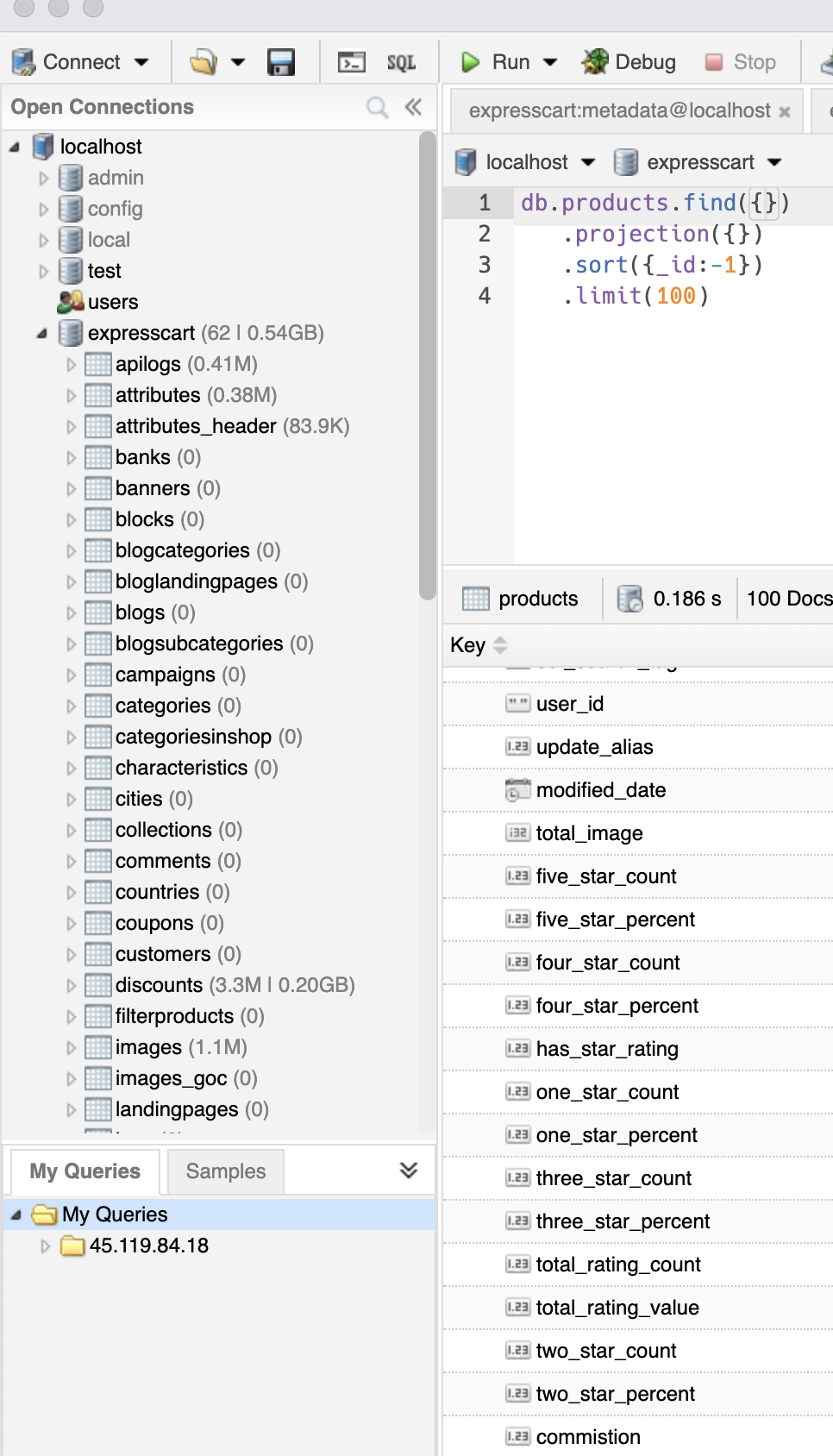
Bước tiếp theo chúng ta cần tải source code api_adayroi về. các bạn nhấn vào đây để tải bộ source node về
Chú ý bộ source này đã code module node rồi, nên không cần phải chạy npm install
Sau khi giải nén xong các bạn bật webstorm lên và mở thư mục này ra
chúng ta sẽ có như hình sau
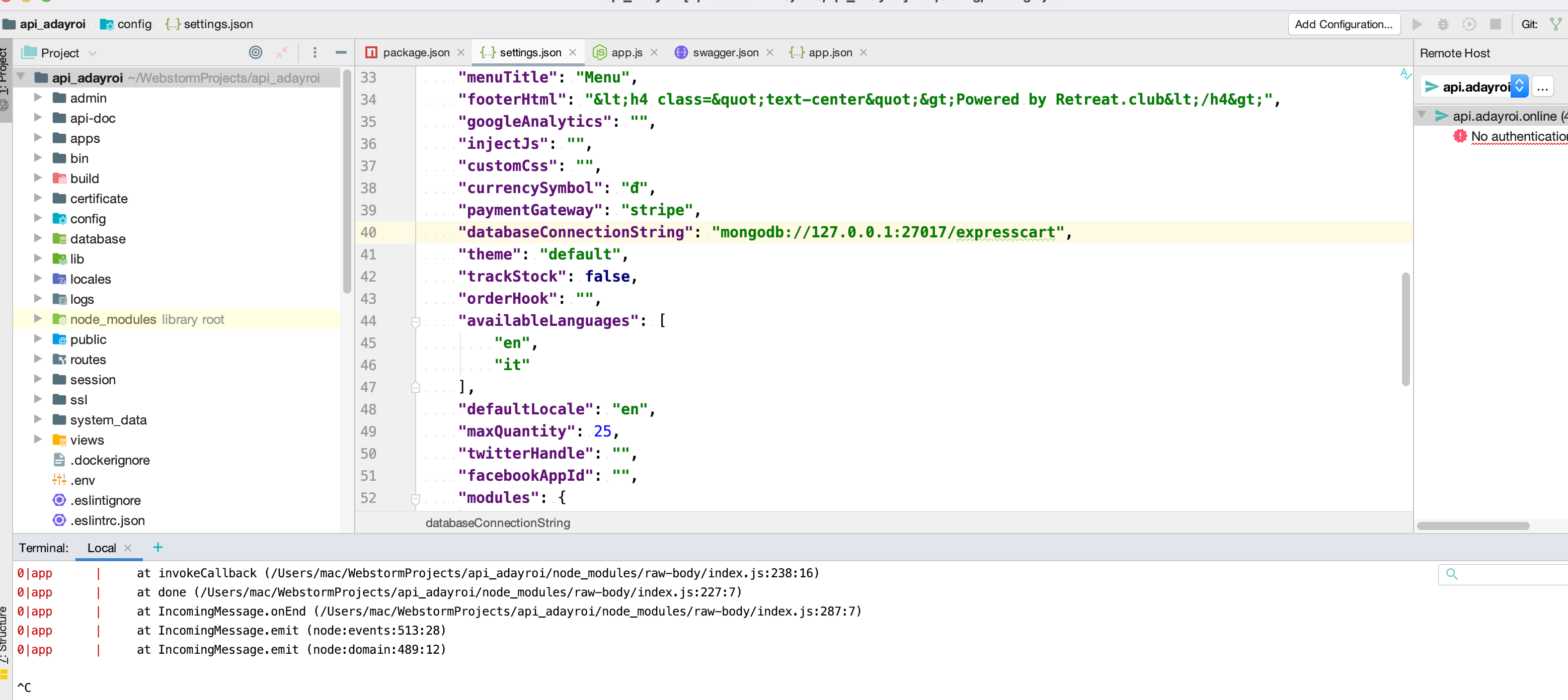
Sau đó các bạn mở terminal trên websotrm để chạy lệnh sau
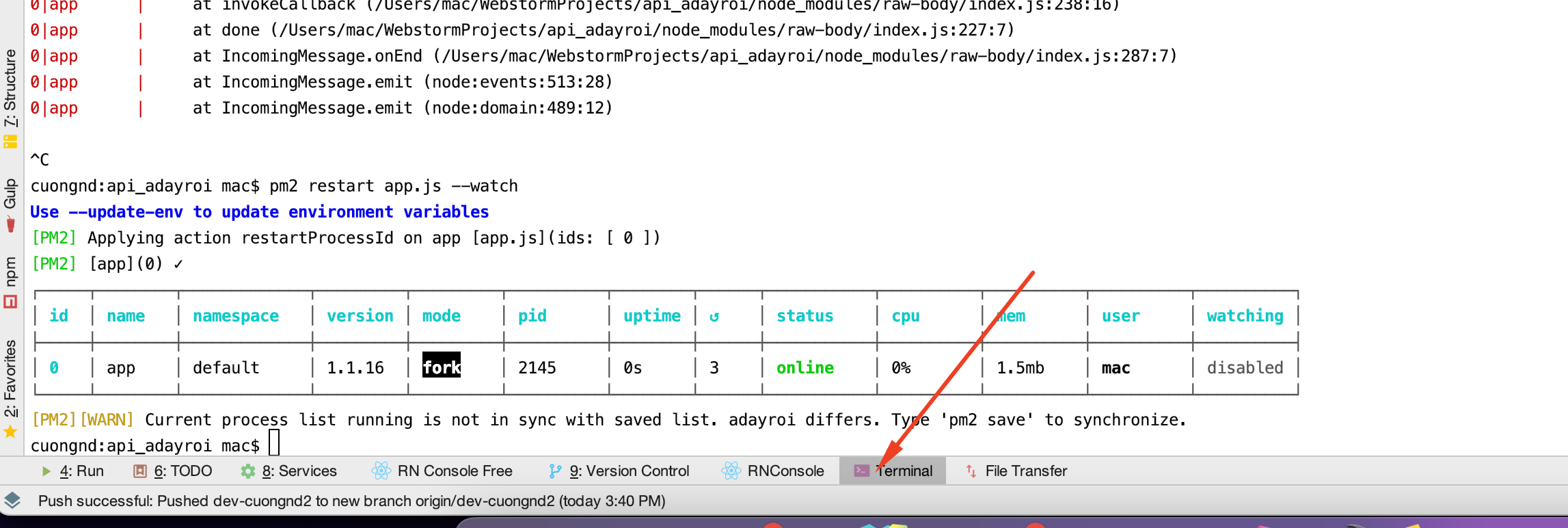
pm2 start app.js --watch
Chú ý nếu chưa có pm2
bạn cần chạy lệnh sau để cài npm install pm2
sau đó gõ lại lệnh như trên là được
Sau đó các bạn ở trình duyệt lên và gõ địa chỉ http://localhost:1114/doc
Nếu bạn nhìn thấy như sau thì ok
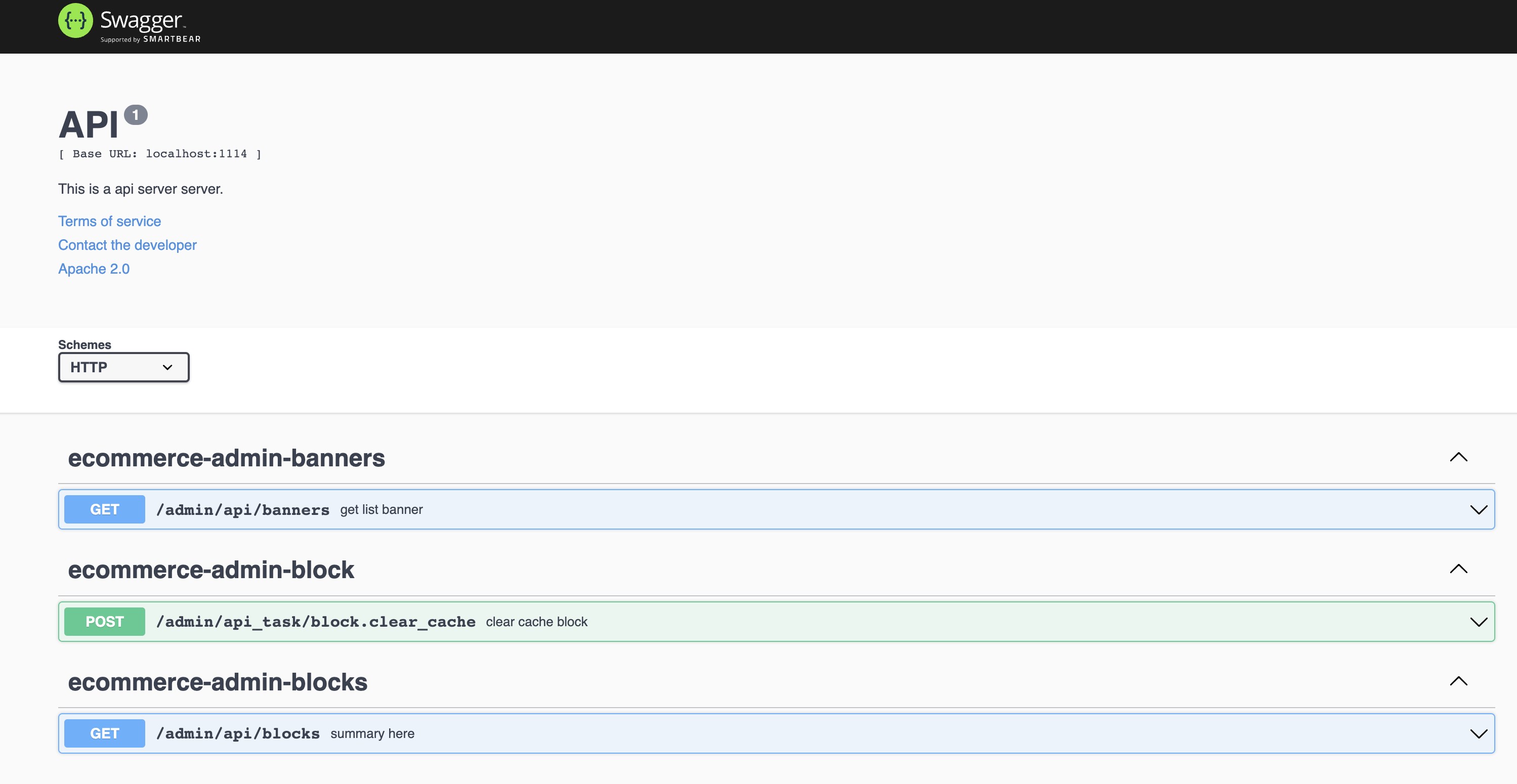
Như vậy là các bạn đã cài xong một con server api_adayroi của node js. việc tiếp theo là các bạn cần phải viết api để app có thể gọi đến nó và hiển thị dữ liệu lên
Nếu trong quá trình cập nhật code của nodejs chúng ta cần phải sử dụng lệnh sau để reset lại app pm2 restart app --watch
Ngoài lệnh sau để xem log từ phía server : pm2 log app
cài đặt Redis-server trên Windows
Cài đặt Redis Server trên Windows
Hiện tại Redis Server vẫn chưa có bản Offical dành cho windows. (Không nên chạy Redis-Server trên Windows vì có thể nó sẽ có một số lỗi, chưa tối ưu và không được update)
Tuy nhiên bạn vẫn có thể download các phiên bản cũ tại https://github.com/MicrosoftArchive/redis/releases để chạy thử và test trên windows.
Bạn có thể download file cài đặt .msi hoặc file .zip (giải nén về chạy file redis-server.exe là được)
Ở đây mình tải file .msi để cài đặt. Trong quá trình cài đặt nó sẽ cho phép chúng ta tùy chỉnh một số tham số theo ý muốn.
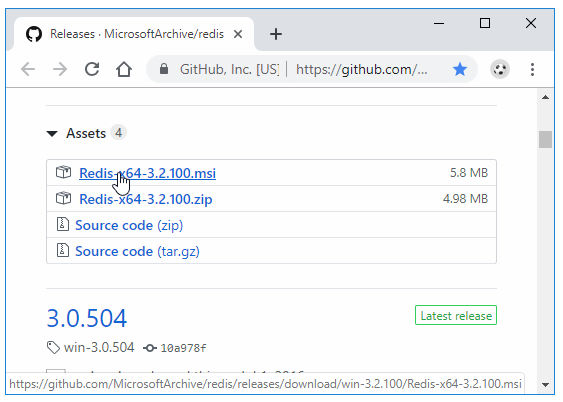
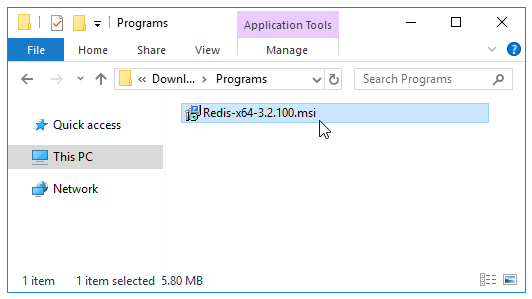
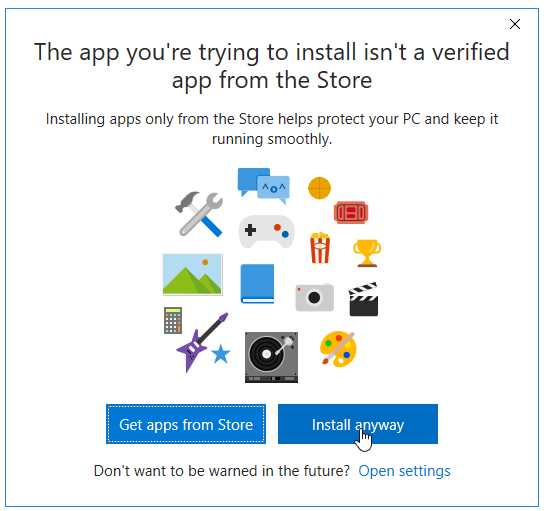
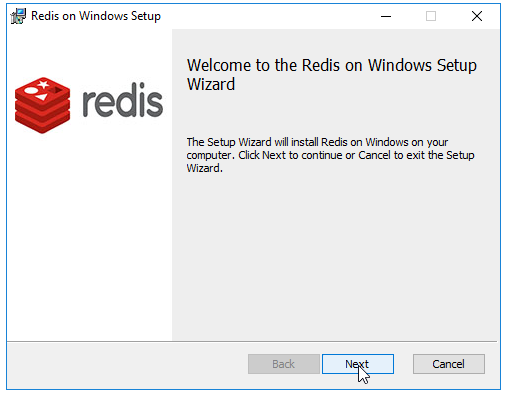
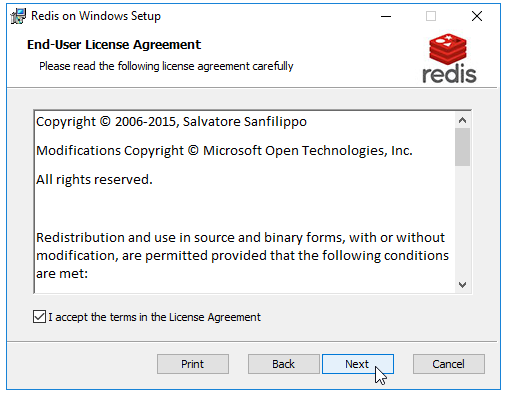
Trong phần Install Redis on Windows to các bạn chọn thư mục muốn cài đặt
Nhớ chọn ô Add the Redis … nó sẽ tự động thêm thư mục cài đặt vào biến môi trường, sau đó bạn có thể chạy lệnh redis-server, redis-cli ở bất kỳ thư mục nào trong màn hình cmd/powershell
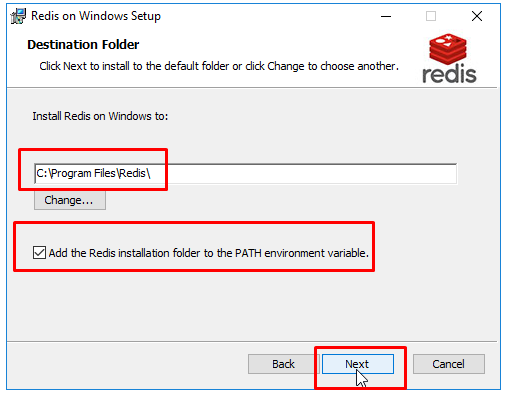
Chọn Port cho Redis Server (mặc định là 6379)
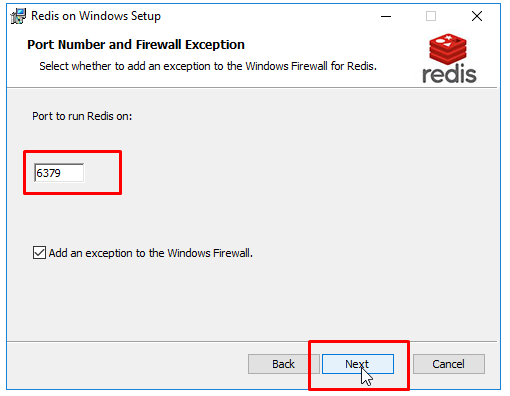
Bạn cũng có thể giới hạn dung lượng tối đa dành cho Redis Server (ở đây mình không đặt giới hạn)
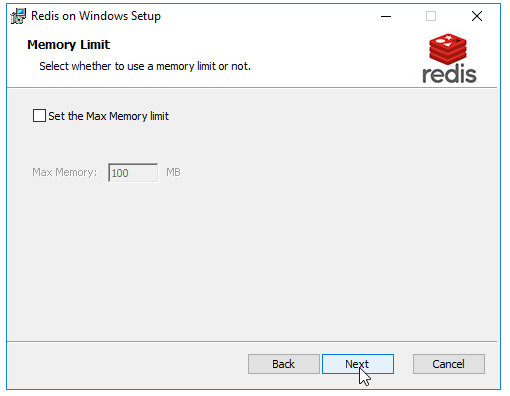
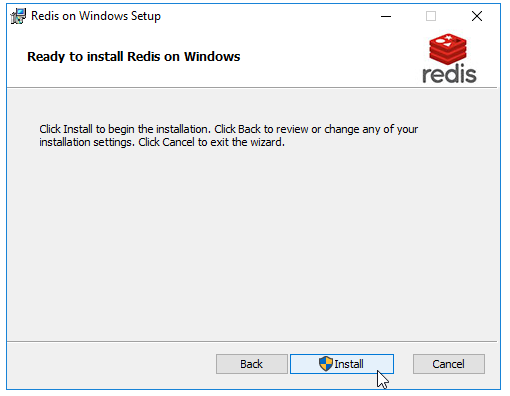
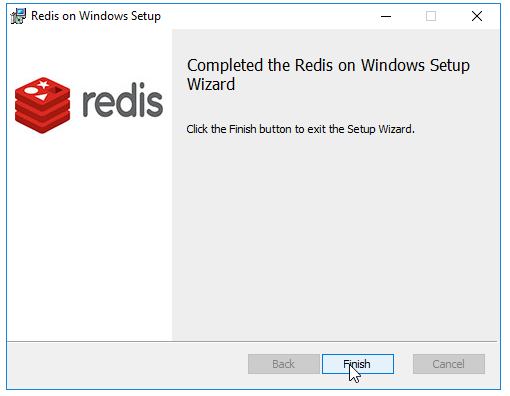
Sau khi cài đặt xong, mở màn hình cmd hoặc powershell và chạy lệnh redis-server
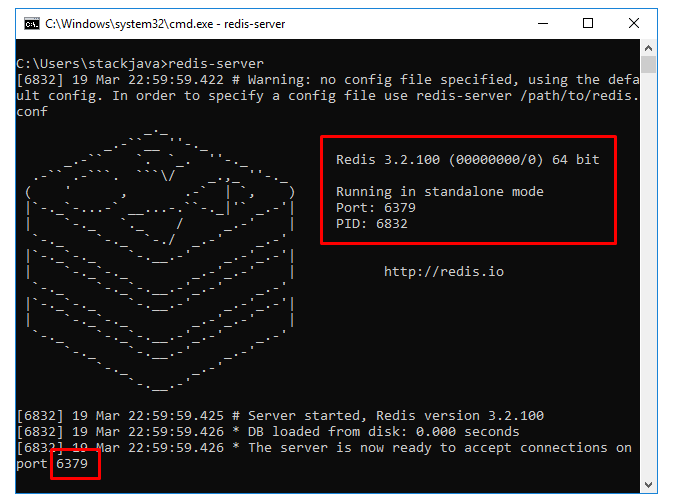
Để sử dụng file redis.conf cấu hình cho redis-server bạn có thể chạy lệnh redis-server với đường dẫn tới file redis.conf
Ví dụ redis-server C:/redis.conf
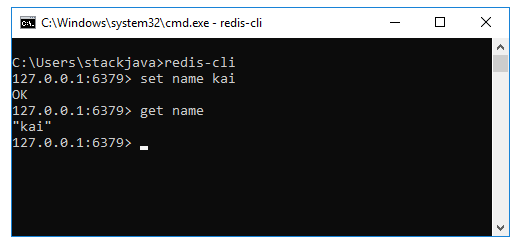
Chạy lệnh redis-cli để connect tới redis server và thực hiện thêm, lấy dữ liệu
set name kai: lưu chuỗi text kai vào biến name
get name: lấy giá trị trong biến name
Okay, Done!
Cài đặt mongorestore trên window
Đây là công cụ để import db expresscart vào mongodb
Đầu tiên các bạn vào đường linh sau nhấn vào đây để vào đường link này
Tại đây các bạn tìm đến dòng có nội dung sau "
MongoDB Command Line Database Tools Download
"
hoặc các bạn có thể nhìn như hình
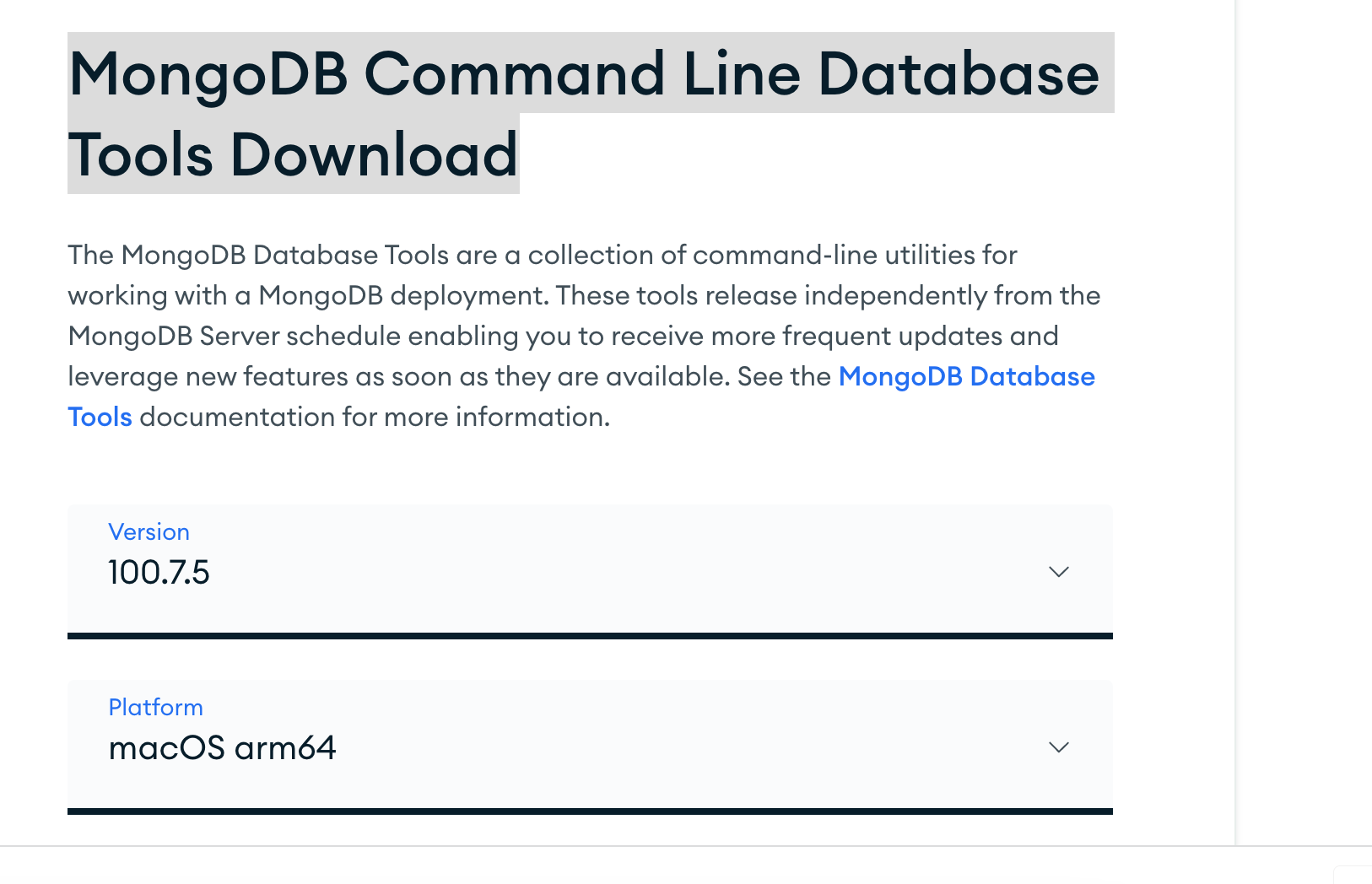
Sau đó các bạn tìm đúng phiên bản window của các bạn. tiếp theo các bạn tải về, sau đó giải nén ra
tiếp theo bạn copy thư mục giải nén của mình vào một thư mục nào đó để lưu lại, tránh tình trạng xóa mất
Ví dụ tôi lưu ở thư mục d:/study/mongotool
Bây giờ các bạn mở thư mục này ra, bạn sẽ nhìn thấy thư mục bin
d:/study/mongotool/bin bạn nhớ đường dẫn này. tiếp theo bạn chạy
Thêm thư mục vào biến PATH
Để bắt đầu, nhấp chuột phải vào biểu tượng Máy tínhhoặc PC nàytrên màn hình và chọn Thuộc tính. Nếu bạn chưa có biểu tượng đó trên màn hình, bạn có thể thêm bất kỳ biểu tượng máy tính để bàn nào bị thiếu dễ dàng.

Trên Hệ thốngmạnh mẽ, bạn sẽ thấy liên kết Cài đặt hệ thống nâng caoở phía bên trái.

Thao tác này sẽ hiển thị hộp thoại Thuộc tính Hệ thống, hộp thoại này đã được mở cho tab Nâng cao. Tiếp tục và nhấp vào nút Biến môi trườngở dưới cùng.

Trên Biến môi trườnghộp thoại, bạn sẽ thấy hai bộ biến: một cho biến người dùng và biến khác cho biến hệ thống. Cả hai danh sách đều có biến PATH, vì vậy bạn phải quyết định biến nào cần chỉnh sửa.

Nếu bạn chỉ cần các lệnh cho tài khoản người dùng của riêng bạn, sau đó chỉnh sửa biến người dùng. Nếu bạn cần nó để làm việc trên hệ thống máy tính bất kể người dùng đã đăng nhập thì hãy chỉnh sửa biến hệ thống. Nhấp vào Đường dẫnvà sau đó nhấp vào Chỉnh sửa.

Bây giờ ban bổ xung d:/study/mongotool/bin vào PATH là xong, giờ bạn sẽ quay lại để import db vào nhé
Cấu hình file swagger.json
Mởi flie : api-doc/swagger.json
Bổ xung địa chỉ ip localhost trên máy tính của các bạn vào đây
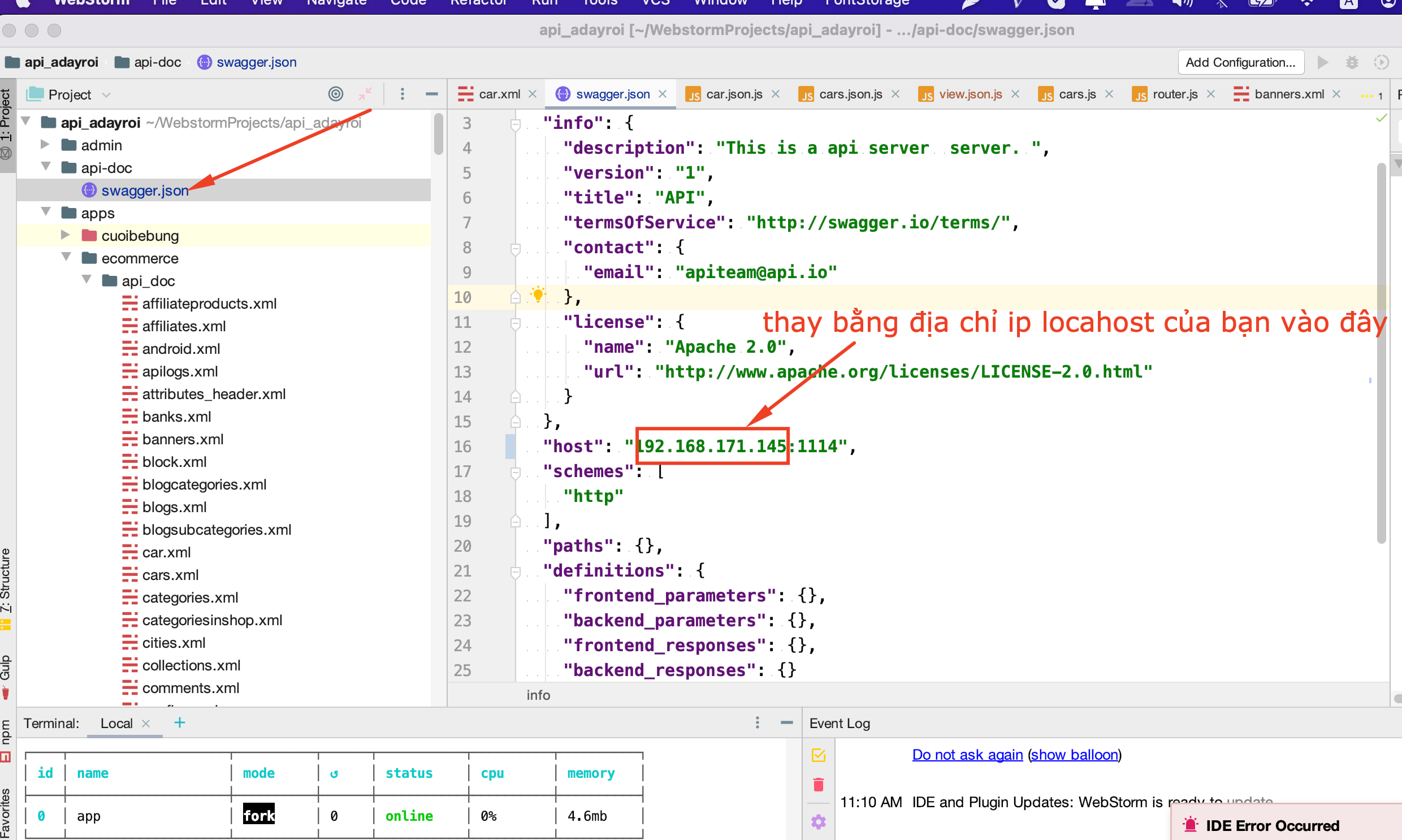
Sau đó các bạn mở trình duyệt gõ địa chỉ sau http://192.168.171.145:1114/doc (Nhớ thay bằng địa chỉ ip của bạn nhé)
Tạo file cars.xml
Tên file: cars.xml
Nơi lưu file: admin/apps/ecommerce/api_doc
Nội dung file: cars.xml
<?xml version="1.0" encoding="utf-8"?>
<list_api>
    <scope type="get" path="/list" authorization="false">
        <content summary="get list car" description="get list car" type="list">
            <parameters name="keywords" type="string"  in="query" />
            <responses code="200" description="ok">
            </responses>
            <responses code="404" description="not found">

            </responses>
        </content>
    </scope>
    <scope type="get" route="/{id}">
        <content summary="get car by id" description="get car by id" type="item">
            <parameters name="id" type="string"  in="path" />

            <responses code="200" description="ok">
            </responses>
            <responses code="404" description="not found">

            </responses>
        </content>
    </scope>

    <scope type="post" task="delete" authorization="false">
        <content summary="delete car" description="delete car">
            <parameters name="car_id" type="string"  in="query" />
            <responses code="200" description="ok">
            </responses>
            <responses code="404" description="not found">

            </responses>
        </content>
    </scope>
    <scope type="post"  path="" >
        <content summary="create car"  description="create car">
            <parameters name="Authorization" type="string"  in="header" />
            <parameters name="car" type="object"  in="body" schema="#/definitions/cars" />

            <responses code="200" description="ok">
            </responses>
            <responses code="404" description="not found">

            </responses>
        </content>
    </scope>
    <scope type="delete"  path="">
        <content summary="delete car"  description="delete car">
            <parameters name="id" type="string"  in="path" />

            <responses code="200" description="ok">
            </responses>
            <responses code="404" description="not found">

            </responses>
        </content>
    </scope>
    <scope type="put"  route="/{id}">
        <content summary="update car"  description="update car">
            <parameters name="id" type="string"  in="path" />
            <parameters name="car" type="object"  in="body" />
            <responses code="200" description="ok">
            </responses>
            <responses code="404" description="not found">

            </responses>
        </content>
    </scope>
</list_api>
Tạo file carcategories.xml
Tại thư mục :admin/apps/ecommerce/api_doc
Tạo file carcategories.xml
Nội dung file
<?xml version="1.0" encoding="utf-8"?>
<list_api>
    <scope type="get" path="/list" authorization="false">
        <content summary="get list carcategory" description="get list carcategory" type="list">
            <parameters name="keywords" type="string"  in="query" />
            <responses code="200" description="ok">
            </responses>
            <responses code="404" description="not found">

            </responses>
        </content>
    </scope>
    <scope type="get" route="/{id}">
        <content summary="get carcategory by id" description="get carcategory by id" type="item">
            <parameters name="id" type="string"  in="path" />

            <responses code="200" description="ok">
            </responses>
            <responses code="404" description="not found">

            </responses>
        </content>
    </scope>

    <scope type="post" task="delete" authorization="false">
        <content summary="delete carcategory" description="delete carcategory">
            <parameters name="carcategory_id" type="string"  in="query" />
            <responses code="200" description="ok">
            </responses>
            <responses code="404" description="not found">

            </responses>
        </content>
    </scope>
    <scope type="post"  path="" >
        <content summary="create carcategory"  description="create carcategory">
            <parameters name="Authorization" type="string"  in="header" />
            <parameters name="carcategory" type="object"  in="body" schema="#/definitions/carcategorys" />

            <responses code="200" description="ok">
            </responses>
            <responses code="404" description="not found">

            </responses>
        </content>
    </scope>
    <scope type="delete"  path="">
        <content summary="delete carcategory"  description="delete carcategory">
            <parameters name="id" type="string"  in="path" />

            <responses code="200" description="ok">
            </responses>
            <responses code="404" description="not found">

            </responses>
        </content>
    </scope>
    <scope type="put"  route="/{id}">
        <content summary="update carcategory"  description="update carcategory">
            <parameters name="id" type="string"  in="path" />
            <parameters name="carcategory" type="object"  in="body" />
            <responses code="200" description="ok">
            </responses>
            <responses code="404" description="not found">

            </responses>
        </content>
    </scope>
</list_api>
Tạo table cars.js
Tên file: cars.js
Nơi lưu file: admin/apps/ecommerce/tables (Nếu bạn đã có bảng cars rồi thì điều chỉnh lại các trường cho chính xác nhé)
Nội dung file:
var table = require(`${path_root}/lib/mvc/tables/Table`);
class cars  extends table{
    constructor(req, res,next){
        super(req, res,next);
        this._id="";
        this.car_name="";
        this.car_color="";
        this.car_model="";
        this.car_description="";
        this.added_date="";
        this.state=1;
        //Nếu có thêm các trường thì bổ xung ở đây
        //hiện mới có rất ít các trường của item, do đó tùy từng thuộc tính và kiểu dữ liệu mà các bạn bổ xung vào đây nhé
        // chú ý : các trường nên trùng với các trường của item trong viewobject của app android nhé

    }
}
module.exports =cars;Tạo bảng carcategories.js
Tại thư mục admin/apps/ecommerce/tables
Tạo file carcategories.js
Nội dung file
var table = require(`${path_root}/lib/mvc/tables/Table`);

class carcategories extends table {
    constructor(req, res,next) {
        super();
        this._id = "";
        this.name = "";
        this.image= "";
        this.note= "";
        this.published=1;
        this.created_date = new Date();
        this.modify_date = new Date();
    }
}

module.exports = carcategories;
Xây dựng file model car.js
Tại thư mục admin/apps/ecommerce/models
Tên file: car.js
Nội dung file:
var modelbackenditem = require(`${path_root}/lib/mvc/models/modelbackenditem`);
var model = require(`${path_root}/lib/mvc/models/model`);
const factory = require(`${path_root}/lib/Factory.js`);
class car extends modelbackenditem {
    tableName() {
        return "cars";
    }
    formXmlName() {
        return "car";
    }
    async getItem(req, res, next,id) {
        const input = factory.getInput(req);
        if(typeof id==="undefined"){
            id=input.getString("id","");
        }
        const car= await super.getItem(req, res, next,id);
        car.image=await this.getImageByCarId(req, res, next,car._id.toString());
        return car
    }
    async getImageByCarId(req, res, next,img_parent_id) {
        const db = req.app.db;
        const item = await db.images.findOne(
            {
                img_parent_id: img_parent_id.toString(),
                img_type:"car-image"
            }
            );
        if (!item) {
            // If API request, return json
            if (req.apiAuthenticated) {
                res.status(400).json({message: 'Item not found'});
                return null;
            }
            req.session.message = 'Item not found';
            req.session.messageType = 'danger';
            return null;
        }

        return item;
    }
    async save(data) {
        let car=await super.save(data);
        const imageModel=model.getInstance('image',0,req, res, next);
        let current_image=await imageModel.getImageBycarId(this.req, this.res, this.next,car._id);
        let car_id=car._id;
        if (!this.req.files || Object.keys(this.req.files).length === 0) {

        }

        if(this.req.files !== null && typeof this.req.files.image !=="undefined") {
            // The name of the input field (i.e. "sampleFile") is used to retrieve the uploaded file
            let image = this.req.files.image;
            // Use the mv() method to place the file somewhere on your server
            let img_path = `backend/images/${image.name}`;
            const modelImage = model.getInstance("image", 1, this.req, this.res, this.next);
            image.mv(`${path_root}/public/${img_path}`, async function (err) {
                if (err) {
                    //return this.res.status(500).send(err);
                }
            });
            let data_image = {
                "_id": "",
                "img_id": "",
                "img_parent_id": car_id,
                "img_type": "",
                "img_path": img_path,
                "Img_width": "",
                "img_height": "",
                "img_desc": "",
            };
            if(typeof current_image!=="undefined"){
                data_image['_id']=current_image._id
            }
            data_image = await modelImage.save(data_image);
            car.default_photo = data_image;
        }
        return  car;
    }


}
module.exports = car;
Xây dựng Model cars.js
Tại thư mục : admin/apps/ecommerce/models
tạo file cars.js
Nội dung file:
var modelbackendlist = require(`${path_root}/lib/mvc/models/modelbackendlist`);
const model = require(`${path_root}/lib/mvc/models/model.js`);
class cars extends modelbackendlist {
    constructor() {
        super();

    }
    tableName() {
        return "cars";
    }
    async getList(req, res, next){
        let list_car= await super.getList(req, res, next);
        let imageModel=model.getInstance('image',1,req, res, next);
        for await (const car of list_car) {
            car.default_photo=await imageModel.getImageByBannerId(req, res, next,car._id);
            if(typeof car.default_photo !=="undefined")
                car.image=`/${car.default_photo.img_path}`;
        }
        return  list_car
    }

}

module.exports = cars;Tạo model carcategory.js
Tại thư mục apps/ecommerce/models
tạo file carcategory.js
Nội dung file
var modelbackenditem = require(`${path_root}/lib/mvc/models/modelbackenditem`);
var model = require(`${path_root}/lib/mvc/models/model`);
const factory = require(`${path_root}/lib/Factory.js`);
class carcategory extends modelbackenditem {
    tableName() {
        return "carcategories";
    }
    formXmlName() {
        return "carcategory";
    }
    async getItem(req, res, next,id) {
        const input = factory.getInput(req);
        if(typeof id==="undefined"){
            id=input.getString("id","");
        }
        const carcategory= await super.getItem(req, res, next,id);

        carcategory.image=await this.getImageByCarCategoryId(req, res, next,carcategory._id.toString());
        return carcategory
    }
    async getImageByCarCategoryId(req, res, next,img_parent_id) {
        const db = req.app.db;
        const item = await db.images.findOne(
            {
                img_parent_id: img_parent_id.toString(),
                img_type:"carcategory-image"
            }
            );
        if (!item) {
            // If API request, return json
            if (req.apiAuthenticated) {
                res.status(400).json({message: 'Item not found'});
                return null;
            }
            req.session.message = 'Item not found';
            req.session.messageType = 'danger';
            return null;
        }

        return item;
    }
    async save(data) {
        let carcategory=await super.save(data);
        const imageModel=model.getInstance('image',0,req, res, next);
        let current_image=await imageModel.getImageByCarCategoryId(this.req, this.res, this.next,car._id);
        let carcategory_id=carcategory._id;
        if (!this.req.files || Object.keys(this.req.files).length === 0) {

        }

        if(this.req.files !== null && typeof this.req.files.image !=="undefined") {
            // The name of the input field (i.e. "sampleFile") is used to retrieve the uploaded file
            let image = this.req.files.image;
            // Use the mv() method to place the file somewhere on your server
            let img_path = `backend/images/${image.name}`;
            const modelImage = model.getInstance("image", 1, this.req, this.res, this.next);
            image.mv(`${path_root}/public/${img_path}`, async function (err) {
                if (err) {
                    //return this.res.status(500).send(err);
                }
            });
            let data_image = {
                "_id": "",
                "img_id": "",
                "img_parent_id": carcategory_id,
                "img_type": "",
                "img_path": img_path,
                "Img_width": "",
                "img_height": "",
                "img_desc": "",
            };
            if(typeof current_image!=="undefined"){
                data_image['_id']=current_image._id
            }
            data_image = await modelImage.save(data_image);
            carcategory.default_photo = data_image;
        }
        return  carcategory;
    }


}
module.exports = carcategory;Tạo model carcategories.js
Tại thư mục : admin/apps/ecommerce/models
Tạo file carcategories.js
Nội dung file
var modelbackendlist = require(`${path_root}/lib/mvc/models/modelbackendlist`);
const factory = require(`${path_root}/lib/Factory.js`);
var model = require(`${path_root}/lib/mvc/models/model`);
const utility = require(`${path_root}/lib/Utilities/Utility.js`);
class carcategories extends modelbackendlist {
    constructor() {

        super();

    }

    async getWhereQuery(req, res, next) {

        const input = factory.getInput(factory.getReq());
        const data = input.getData();
        let filter_keyword = input.getString("filter_keyword", "");
        let list_filter_carcategories_ids = input.getArray("filter_carcategories", []);
        let filter_has_image = input.getInt("filter_has_image", -1);
        list_filter_carcategories_ids = list_filter_carcategories_ids.filter(function (el) {
            return el != null && el !== "";
        });
        let aggregate= [];
        let match={

        };
        if(filter_keyword!==""){
            match.title={
                '$regex': filter_keyword, '$options': 'i'
            }
        }


        aggregate.push(
            { $sort : { modify_date : -1} }
        );

        if(filter_has_image!==-1){
            if(parseInt(filter_has_image)===0)
            {
                match.total_image=0;
            }else{
                match.total_image={
                    $gt:0
                };
            }
        }
        aggregate.push({
            $match:match
        });

        return aggregate;
    }

    getSelectQuery() {
        return {
            "_id": 1,
            "name": 1,
            "image": 1,
            "note": 1,
            "published": 1,
            "created_date": 1,
            "modify_date": 1
        };
    }

    async getList(req, res, next) {
        const db = req.app.db;
        let aggregate=await this.getWhereQuery(req, res, next);
        aggregate.push({
            $project: this.getSelectQuery()
        });
        aggregate.push({
            $limit: this.limit()
        });
        aggregate.push({
            $skip: this.start()
        });

        const response = await db.carcategories.aggregate(aggregate,{allowDiskUse: true}).toArray();
        let list_car=response;
        let list_car_id=[];
        let list_car2={};
        for await (const car of list_car) {
            list_car_id.push(car._id.toString());
            list_car2[car._id.toString()]=car;
        }
        const list_image = await db.images
            .find({
                    img_parent_id: {
                        $in: list_car_id
                    }
                }
            )
            .toArray();

        list_image.forEach(image => {
            if(typeof list_car2[image.img_parent_id.toString()].default_photo==="undefined")
                list_car2[image.img_parent_id.toString()].default_photo=image;
        });

        return list_car;

    }

    tableName() {
        return "carcategories";
    }
    async getData(req, res, next) {
        let list_carcategory=await this.getList(req, res, next);
        let total=await this.getTotal(req, res, next);
        //let total=10;
        return {
            total:total,
            start:this.start(),
            limit:this.limit(),
            list:list_carcategory
        };
    }
    async getTotal(req, res, next) {
        const db = req.app.db;
        let aggregate=await this.getWhereQuery(req, res, next);
        aggregate.push({ $group: { _id: null, count: { $sum: 1 } } });
        const response = await db.carcategories.aggregate(aggregate,{allowDiskUse: true}).toArray();
        let total=0;
        if(response.length>0){
            total=response[0].count;
        }
        return total;
    }

    async getCarsByIds(listId = [], req, res, next) {
        const db = req.app.db;
        const listCars = await db.carcategories
            .find({
                    id: {
                        $in: listId
                    }
                }
            )
            .toArray();
        return listCars;
    }

}

module.exports = carcategories;
Thêm table cars và carcategories vào db
Mở file lib/db.js
Bổ xung dòng sau
db.cars = db.collection('cars');
db.carcategories = db.collection('carcategories');
Vào như hình dưới đây

Xây dựng controller cho car.json.js
Tên file: car.json.js
Nơi lưu file: admin/apps/ecommerce/controllers
Nội dung file:
var controllerfrontenditem = require(`${path_root}/lib/mvc/controllers/controllerfrontenditem`);
const factory = require(`${path_root}/lib/Factory.js`);
const common = require(`${path_root}/lib/common`);
const config = common.getConfig();
var model = require(`${path_root}/lib/mvc/models/model`);
const utility = require(`${path_root}/lib/Utilities/Utility.js`);
const redisClient = require('redis').createClient;
const redis = redisClient(6379, 'localhost');
class car_json extends controllerfrontenditem {
    async update_total_product_in_sub_car() {
        let car_model=model.getInstance("car",1,this.req,this.res,this.next);
        await car_model.update_total_product_in_sub_car(this.req,this.res,this.next);
        return {
            result:"success"
        };
    }
    async update_car() {
        let input=factory.getInput(this.req);
        let data=input.getData();
        let id=input.getString('id',"");
        if(id===""){
            return {
                result:"error",
                code:101,
                errorMessage: "car must not empty",
                data:[]
            };
        }
        let current_model=model.getInstance("car",1,this.req,this.res,this.next);
        let item= await current_model.getItem(this.req,this.res,this.next,id);
        console.log("item",item);
        if(typeof item==="undefined" || item===false || item===null){
            return {
                result:"error",
                code:101,
                errorMessage: "car not exists",
                data:[]
            };
        }
        item=current_model.save(data);
        return {
          result:"success",
          data:item
        };
    }
    async delete_car() {
        let input=factory.getInput(this.req);
        let data=input.getData();
        let car_id=input.getString('car_id',"");
        if(car_id===""){
            return {
                result:"error",
                code:101,
                errorMessage: "car id must not empty",
                data:[]
            };
        }
        let current_model=model.getInstance("car",1,this.req,this.res,this.next);
        let item= await current_model.getItem(this.req,this.res,this.next,car_id);
        if(typeof item==="undefined" || item===false || item===null){
            return {
                result:"error",
                code:101,
                errorMessage: "car not exists",
                data:[]
            };
        }
        current_model.delete(this.req, this.res, this.next,car_id);
        return {
          result:"success",
          data:[]
        };
    }


}
module.exports = car_json;
Xây dựng controller cho carcategory.json.js
Tên file: carcategory.json.js
Nơi lưu file: apps/ecommerce/controllers
Nội dung file:
var controllerfrontenditem = require(`${path_root}/lib/mvc/controllers/controllerfrontenditem`);
const factory = require(`${path_root}/lib/Factory.js`);
const common = require(`${path_root}/lib/common`);
const config = common.getConfig();
var model = require(`${path_root}/lib/mvc/models/model`);
const utility = require(`${path_root}/lib/Utilities/Utility.js`);
const redisClient = require('redis').createClient;
const redis = redisClient(6379, 'localhost');
class carcategory_json extends controllerfrontenditem {
    async update_total_product_in_sub_carcategory() {
        let carcategory_model=model.getInstance("carcategory",1,this.req,this.res,this.next);
        await carcategory_model.update_total_product_in_sub_carcategory(this.req,this.res,this.next);
        return {
            result:"success"
        };
    }
    async update_carcategory() {
        let input=factory.getInput(this.req);
        let data=input.getData();
        let id=input.getString('id',"");
        if(id===""){
            return {
                result:"error",
                code:101,
                errorMessage: "carcategory must not empty",
                data:[]
            };
        }
        let current_model=model.getInstance("carcategory",1,this.req,this.res,this.next);
        let item= await current_model.getItem(this.req,this.res,this.next,id);
        console.log("item",item);
        if(typeof item==="undefined" || item===false || item===null){
            return {
                result:"error",
                code:101,
                errorMessage: "carcategory not exists",
                data:[]
            };
        }
        item=current_model.save(data);
        return {
          result:"success",
          data:item
        };
    }
    async delete_carcategory() {
        let input=factory.getInput(this.req);
        let data=input.getData();
        let carcategory_id=input.getString('carcategory_id',"");
        if(carcategory_id===""){
            return {
                result:"error",
                code:101,
                errorMessage: "carcategory id must not empty",
                data:[]
            };
        }
        let current_model=model.getInstance("carcategory",1,this.req,this.res,this.next);
        let item= await current_model.getItem(this.req,this.res,this.next,carcategory_id);
        if(typeof item==="undefined" || item===false || item===null){
            return {
                result:"error",
                code:101,
                errorMessage: "carcategory not exists",
                data:[]
            };
        }
        current_model.delete(this.req, this.res, this.next,carcategory_id);
        return {
          result:"success",
          data:[]
        };
    }


}
module.exports = carcategory_json;
Tạo view view.json.js cho carcategories
Tại thư mục apps/ecommerce/views/carcategories
Tạo file view view.json.js
Nội dung file
const htmltoobar = require(`${path_root}/lib/Html/HtmlToobar.js`);
const factory = require(`${path_root}/lib/Factory.js`);
const fs = require('fs');
const viewfrontend=require(`${path_root}/lib/mvc/views/view`);
class carcategories_json extends viewfrontend{
    static async display(view, type, req, res, next) {
        const root_path = req.handlebars.helpers.get_root_path();
        const model = require(`${path_root}/lib/mvc/models/model`);
        const input=factory.getInput(req);
        let doc=factory.getDocument();
        switch (type) {
            case "list":
                const modelCarCategories = model.getInstance("carcategories",0,req, res, next);
                const list = await modelCarCategories.getList(req, res, next);

                return {
                    result:"success",
                    code:200,
                    errorMessage:"",
                    data:list
                };
            case "item":
                var id=input.getString('id',"");
                var modelCarCategory = model.getInstance("carcategory",1,req, res, next);
                var item=await modelCarCategory.getItem(req, res, next,id);
                return item;
        }
    };
}
module.exports = carcategories_json;
Xây dựng view carcategories
Tại thư mục admin/apps/ecommerce/views/carcategories nhớ tạo thư mụccarcategories nhé)
Tạo file view.json.js
Nội dung file:
const factory = require(`${path_root}/lib/Factory.js`);
const fs = require('fs');
const viewbackend=require(`${path_root}/lib/mvc/views/view`);
class carcategories_json extends viewbackend{
    static async display(view, type, req, res, next) {
        const root_path = req.handlebars.helpers.get_root_path();
        const model = require(`${path_root}/lib/mvc/models/model`);
        const input=factory.getInput(req);
        let doc=factory.getDocument();
        switch (type) {
            case "list":
                const modelNews = model.getInstance("carcategories",1,req, res, next);
                const list = await modelNews.getList(req, res, next);
                return list;
            case "item":
                const id=input.getString('id',"");
                const modelOrder = model.getInstance("carcategory",1,req, res, next);
                const item=await modelOrder.getItem(req, res, next,id);

                return {
                    result:"success",
                    data:item
                };
        }
    };
}
module.exports = carcategories_json;
Xây dựng view cars
Tại thư mục admin/apps/ecommerce/views/cars (Nhớ tạo thư mục nếu chưa có nhé)
Tạo file : view.json.js
Nội dung file:
const htmltoobar = require(`${path_root}/lib/Html/HtmlToobar.js`);
const factory = require(`${path_root}/lib/Factory.js`);
const fs = require('fs');
const viewbackend=require(`${path_root}/lib/mvc/views/view`);
class cars_json extends viewbackend{
    static async display(view, type, req, res, next) {
        const root_path = req.handlebars.helpers.get_root_path();
        const model = require(`${path_root}/lib/mvc/models/model`);
        const input=factory.getInput(req);
        let doc=factory.getDocument();
        switch (type) {
            case "list":
                const modelNews = model.getInstance("cars",1,req, res, next);
                const list = await modelNews.getList(req, res, next);
                return list;
            case "item":
                const id=input.getString('id',"");
                const modelOrder = model.getInstance("order",1,req, res, next);
                const item=await modelOrder.getItem(req, res, next,id);

                return {
                    result:"success",
                    data:item
                };
        }
    };
}
module.exports = cars_json;
Kiểm tra version của app và kiểm tra version của app server node
Mở file
apps/vendor/views/android/view.json.js
Xem hình dưới đây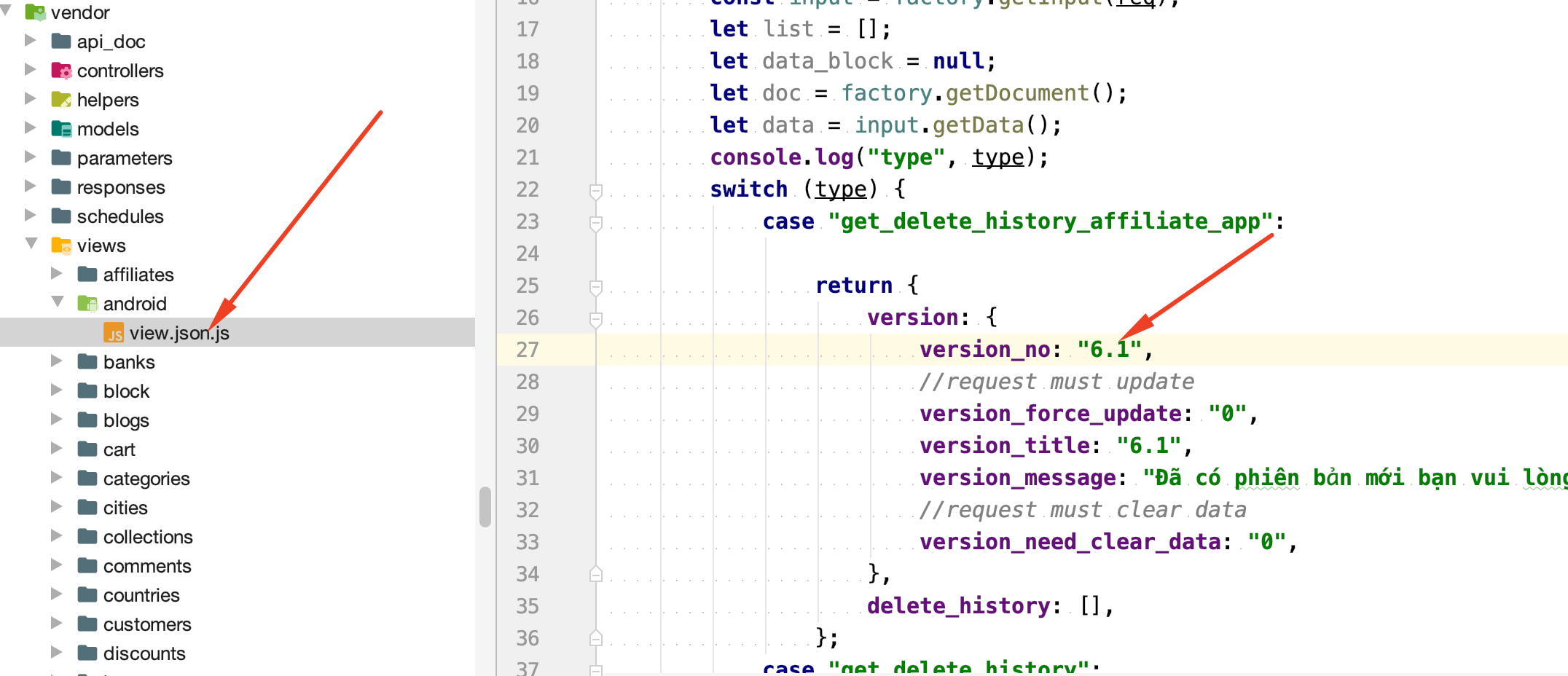
Hiện tại trên app server node đang là 6.1
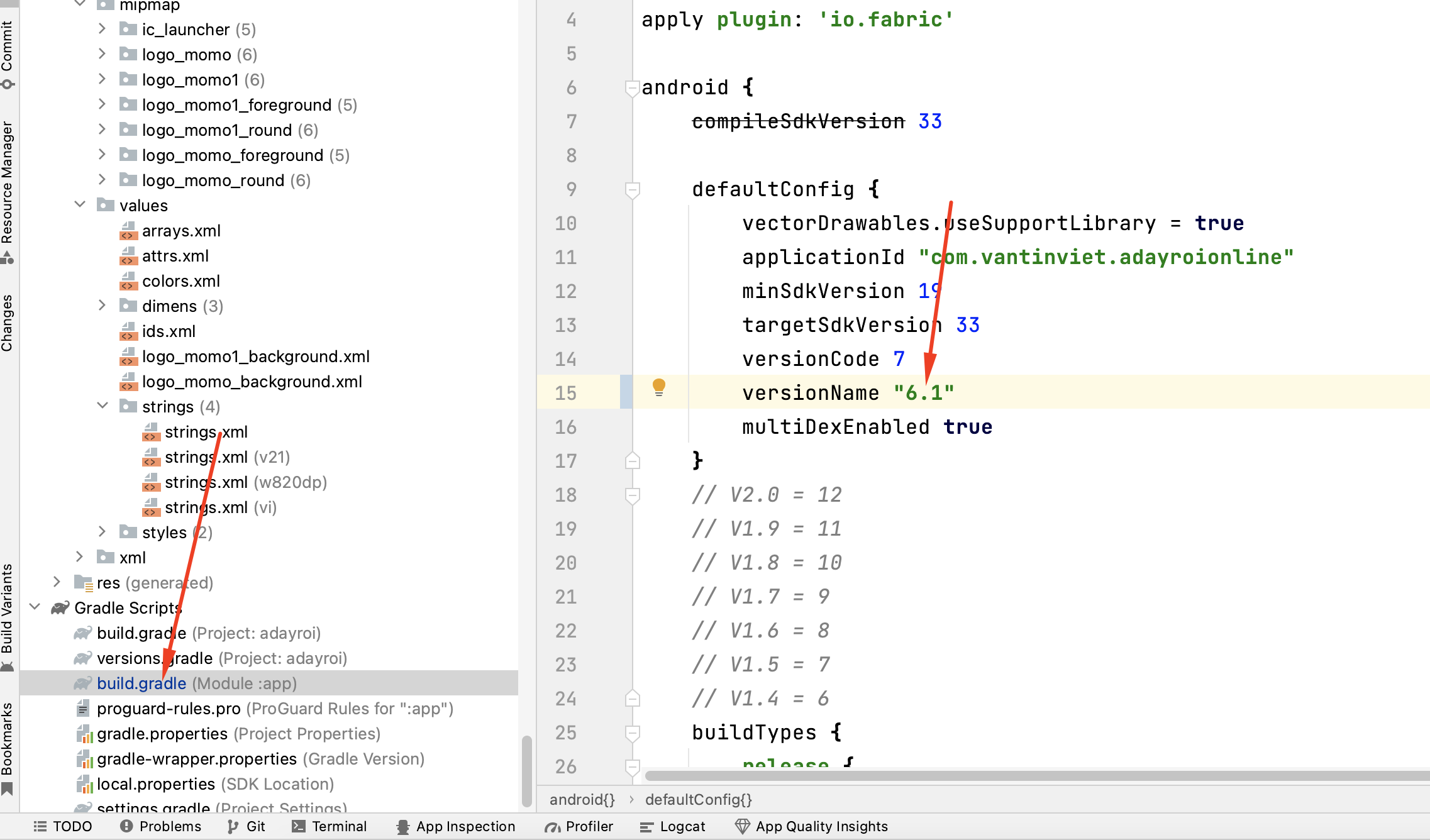
bạn cần kiểm tra xem app của mình đang ở phiên bản nào
bằng cách mở file app/build.gradle trên app android nhé
Kiểm tra xem đang ở version bao nhiêu điều chỉnh có 2 cái về giống nhau nhé
Hoàn thành
Sau khi đã bổ xung xong thì chúng ta đã làm xong phần api của thêm sửa xóa rồi.
giờ các bạn mở http://192.168.171.145:1114/doc lên và tìm phần cars rồi chạy thử api xem được chưa nhé
Cảm ơn bạn đã đọc
Tài liệu được cập nhật thường xuyên. Mọi góp ý xin gửi về đội ngũ Softway.