Xây dựng giao diện backend của hệ thống quản lý admin.adayroi.online
10 chương · 33 bài
Mục lục
- Giới thiệu tổng quan về hệ thống
- Cấu hình hệ thống
- Tạo link cho menu quản lý cars
- Tạo các route 2 bài
- Tạo bảng 2 bài
- Tạo models 2 bài
- Tạo các controller 2 bài
- Tạo các file js cho list form phía client 5 bài
- Tạo các file less 4 bài
- Tạo filter và form 4 bài
- Tạo các trường filed 1 bài
- Tạo các view 2 bài
- Tạo các file layout 4 bài
- Cài đặt nhanh
- Hoàn thành
Giới thiệu tổng quan về hệ thống
https://admin.adayroi.online/ là một hệ thống backend dùng để quản lý rất nhiều các thông tin liên quan đến ứng dụng adayroi trên google play và website https://adayroi.online/
Tương tự như frontend hệ thống cũng được viết bằng nodejs và sử dụng hbs và vujs để viết
link git: https://git.softway.vn/cuongndvn/admin_adayroi bạn nào chưa có tài khoản vui lòng tạo tài khoản và liên hệ với admin để được thêm vào nhóm nhé
Chú ý là khi các bạn pull code về, khi các bạn viết các bạn nhớ tạo brach riêng nhé.
sau đó các bạn chạy lệnh sau yarn install để hệ thống cài các gói package ra nhé
tiếp theo chạy lệnh pm2 start app.js --name admin_adayroi nhé.
Hệ thống được xây dựng dựa trên mô hình mvc và sử dụng microservices
Mục tiêu của ví dụ này, chúng ta sẽ làm các chức năng sau
Quản lý danh mục car chức năng thêm, sửa xóa
quản lý car chức năng thêm, sửa xóa
Việc xây dựng các chức năng khác cũng tương tự như vậy.
Chi tiết các công việc dưới đây
1.Tạo view cho car categories (Quản lý danh mục car)
2.Tạo view quản lý car kết nối tới api quản lý car
Chú là các bước này chỉ mới làm ở phần admin, bạn cần phải dựng api cho quản lý danh mục car và cars nhấn vào đây để xem cách xây dựng các api
Cấu hình hệ thống
Tại thư mục /config
Tạo file settings-local.json
Nội dung file
{
  "AppTitle": "admin.adayroi.online",
  "backend_template": "default",
  "root_url_api": "http://localhost:1114",
  "root_url": "http://localhost:1116",
  "root_url_frontend": "http://localhost:1112",
  "frontend_template": "Cloth",
  "debug": false,
  "debug_language": true,
  "AppDescription": "demo",
  "api_pexels": "563492ad6f91700001000001992be1b03ff4490db9249df0e7567340",
  "cartLogo": "",
  "port": "1116",
  "baseUrl": "http://localhost",
  "emailHost": "smtp-mail.outlook.com",
  "emailPort": 587,
  "emailSecure": false,
  "emailUser": "hi@markmoffat.com",
  "emailPassword": "this_is_the_smtp_password",
  "emailAddress": "hi@markmoffat.com",
  "menuEnabled": true,
  "productsPerRow": 3,
  "productsPerPage": 6,
  "productsPerRowHomePage": 1,
  "menuTitle": "Menu",
  "footerHtml": "<h4 class="text-center">Powered by Retreat.club</h4>",
  "googleAnalytics": "",
  "injectJs": "",
  "customCss": "",
  "currencySymbol": "đ",
  "paymentGateway": "stripe",
  "databaseConnectionString": "mongodb://127.0.0.1:27017/admin_adayroi",
  "theme": "default",
  "trackStock": false,
  "orderHook": "",
  "availableLanguages": [
    "en",
    "it"
  ],
  "defaultLocale": "en",
  "maxQuantity": 25,
  "twitterHandle": "",
  "facebookAppId": "",
  "modules": {
    "enabled": {
      "shipping": "shipping-basic",
      "discount": "discount-voucher"
    },
    "loaded": {
      "shipping": {},
      "discount": {}
    }
  },
  "secretCookie": "f3d5ac396a14e9d18d952ec703ca7fa8f1d4be8f",
  "secretSession": "6a88584536235218bee6ea985081c78c822f6490",
  "themeViews": "../views/themes/Cloth/",
  "env": "development",
  "secret": "s0me-secr3t-goes-here"
}
Tạo link cho menu quản lý cars
Mở file blocks/block_left_sidenav/default.hbs
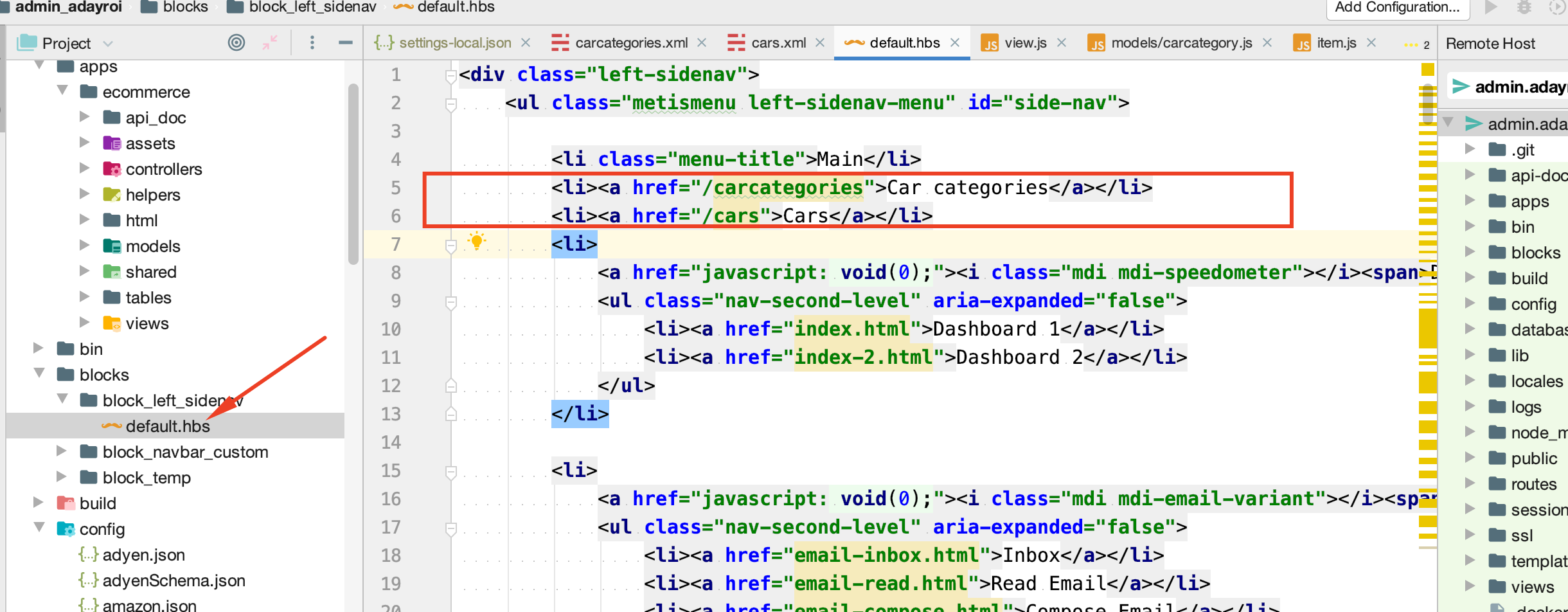
Sau khi bạn thêm xong menu quản lý cars sẽ xuất hiện như hình dưới đây
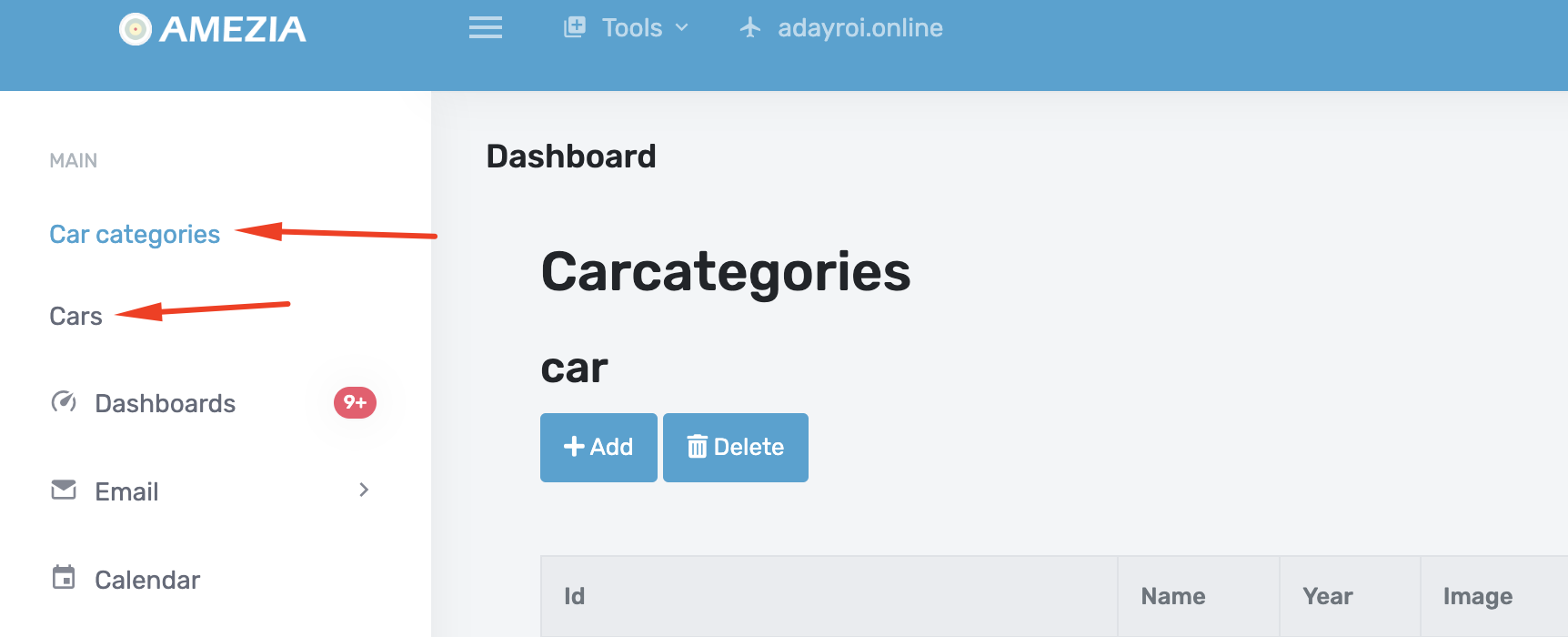
Bây giờ bạn nhấn vô đây thì sẽ mở được trang, nhưng sẽ bị lỗi do chúng ta chưa xây dựng view cho nó, bạn cần hoàn thành các bước tiếp theo nữa nhé
Tạo một route cars
Hệ thống backend cars dùng để quản lý, thêm sửa xóa, khi sử dụng trên web
tại thư mục apps/ecommerce/api_doc
tạo file cars.xml
Nội dung file
<?xml version="1.0" encoding="utf-8"?>
<list_api>
    <scope type="get"  >
        <content summary="get list car" description="get list car" type="list">

        </content>
    </scope>
    <scope type="get" route="/form/{id}"  >
        <content summary="get car by id" description="get car by id" type="form">
        </content>
    </scope>
    <scope type="get" route="/form"  >
        <content summary="create new car" description="create new car" type="form">
        </content>
    </scope>

    <scope type="get" route="/{id}"  >
        <content summary="get car by id" description="get car by id" type="item">
        </content>
    </scope>
    <scope type="put"  route="/{id}">
        <content summary="update car"  description="update car">
        </content>
    </scope>

</list_api>
Tại đây bạn sẽ thấy có rất nhiều các route liên quan đến car, nhưng thêm sửa, xóa

Bây giờ bạn có thể truy cập vào website theo đường dẫn root/cars (Luôn nhớ là root là website gốc của bạn nhé)
Hiện tại website vân chưa chạy được để chạy được bạn cần phải làm các bước tiếp theo nhé
Tạo route cho carcategories
Tạo thư mục
apps/ecommerce/api_doc
Tạo file carcategories.xml
Nội dung file
<?xml version="1.0" encoding="utf-8"?>
<list_api>
    <scope type="get"  >
        <content summary="get list carcategory" description="get list carcategory" type="list">

        </content>
    </scope>
    <scope type="get" route="/form/{id}"  >
        <content summary="get carcategory by id" description="get carcategory by id" type="form">
        </content>
    </scope>
    <scope type="get" route="/form"  >
        <content summary="create new carcategory" description="create new carcategory" type="form">
        </content>
    </scope>

    <scope type="get" route="/{id}"  >
        <content summary="get carcategory by id" description="get carcategory by id" type="item">
        </content>
    </scope>
    <scope type="put"  route="/{id}">
        <content summary="update carcategory"  description="update carcategory">
        </content>
    </scope>

</list_api>
Tạo table cars
Tại thư mục apps/ecommerce/tables
Tạo file cars.js
Nội dung file
var table = require(`${path_root}/lib/mvc/tables/Table`);
class cars  extends table{
    constructor(req, res, next){
        super(req, res, next);
        this._id="";
        this.name="";
        this.year=0;
        this.image="";
        this.category_id="";
        this.status="";
        this.is_feature=0;
        this.note="";
        this.start_date=new Date();
        this.end_date=new Date();
    }
}
module.exports = cars;
Tạo bảng carcategories
Tại thư mục apps/ecommerce/tables
Tạo file carcategories.js
Nội dung file
var table = require(`${path_root}/lib/mvc/tables/Table`);
class carcategories  extends table{
    constructor(req, res, next){
        super(req, res, next);
        this._id="";
        this.name="";
        this.year=0;
        this.image="";
        this.category_id="";
        this.status="";
        this.is_feature=0;
        this.note="";
        this.start_date=new Date();
        this.end_date=new Date();
    }
}
module.exports = carcategories;
Tạo model cars
apps/ecommerce/models/cars.js
var modelbackendlist = require(`${path_root}/lib/mvc/models/modelbackendlist`);
const model = require(`${path_root}/lib/mvc/models/model.js`);
class cars extends modelbackendlist {
    constructor() {
        super();

    }
    tableName() {
        return "cars";
    }
    async getList(req, res, next){
        let list_car= await super.getList(req, res, next);
        let imageModel=model.getInstance('image',req, res, next);
        for await (const car of list_car) {
            car.default_photo=await imageModel.getImageByParentId(req, res, next,car._id,'car');
            if(car.default_photo!==null && typeof car.default_photo !=="undefined")
                car.image=car.default_photo.img_path;
        }
        return  list_car
    }

}

module.exports = cars;
Tạo model car
Tại thư mục apps/ecommerce/models
tạo file car.js
Nội dung file
var modelbackenditem = require(`${path_root}/lib/mvc/models/modelbackenditem`);
const callApi = require(`${path_root}/lib/CallApi`);
class car extends modelbackenditem {
    getSelectField(){
        return {

        };
    }
    tableName() {
        return "cars";
    }
    formXmlName() {
        return "car";
    }


    async getItem(req, res, next,id) {
        let response=await callApi.ApiCallFunctionInModel(req,req.app_name,"car.getItem","post",{
            id:id
        });
        return  response.data;
    }


    async save(data) {
        let car=await super.save(data);
        let image_intro=await this.save_image_to_table_field_in_s3(car.data,"image_intro","car-image");
        car.data.image = image_intro;
        return  car;
    }


}
module.exports = car;
Tạo controller carcategory.js
Tạo thư mục apps/ecommerce/controllers
tạo file carcategory.js
Nội dung file
var controllerbackenditem = require('../../../lib/mvc/controllers/controllerbackenditem');
var model = require('../../../lib/mvc/models/model');
const factory = require(`${path_root}/lib/Factory.js`);
class carcategory extends controllerbackenditem {
    getListViewName(){
        return "carcategories";
    }
    getFormViewName(){
        return "carcategories";
    }
    async apply(data) {

        const input=factory.getInput(this.req);
        let a_return=input.getString('return',"");
        let model=this.getModel();
        if( typeof  data==="undefined"){
            data=input.getData();
        }
        let form_name=this.getFormViewName();
        let form_layout=this.getFormLayoutName();
        let carcategory=await model.save(data);

        let id=carcategory.data._id;
        if(a_return!=="")
        {
            this.res.redirect(`/${form_name}/${form_layout}/${id}?return=${a_return}`);
        }else{
            this.res.redirect(`/${form_name}/${form_layout}/${id}`);
        }

    }

}
module.exports = carcategory;
Tạo controller car.js
Tại thư mục apps/ecommerce/controllers
Tạo file car.js
Nội dung file
var controllerbackenditem = require('../../../lib/mvc/controllers/controllerbackenditem');
var model = require('../../../lib/mvc/models/model');
const factory = require(`${path_root}/lib/Factory.js`);
class car extends controllerbackenditem {
    getListViewName(){
        return "cars";
    }
    getFormViewName(){
        return "cars";
    }
    async apply(data) {

        const input=factory.getInput(this.req);
        let a_return=input.getString('return',"");
        let model=this.getModel();
        if( typeof  data==="undefined"){
            data=input.getData();
        }
        let form_name=this.getFormViewName();
        let form_layout=this.getFormLayoutName();
        let car=await model.save(data);
        let id=car.data._id;
        if(a_return!=="")
        {
            this.res.redirect(`/${form_name}/${form_layout}/${id}?return=${a_return}`);
        }else{
            this.res.redirect(`/${form_name}/${form_layout}/${id}`);
        }

    }

}
module.exports = car;
Tạo js view-cars-list.js
Tại thư mục : public/assets/ecommerce/views_assets/js
Tạo file view-cars-list.js
Nội dung file
(function ($) {
    $.view_cars_list = function (element, options) {
        var defaults = {

        }
        var plugin = this;
        plugin.settings = {}
        var $element = $(element),
            element = element;
        plugin.init = function () {
            plugin.settings = $.extend({}, defaults, options);


        };
        plugin.init();
    }

    $.fn.view_cars_list = function (options) {
        return this.each(function () {
            if (undefined == $(this).data('view_cars_list')) {
                var plugin = new $.view_cars_list(this, options);
                $(this).data('view_cars_list', plugin);
            }
        });
    }
})(jQuery);
Tạo file view-car-form.js
Tại thư mục : public/assets/ecommerce/views_assets/js
Tạo file : view-car-form.js
Nội dung file
(function ($) {
    $.view_car_form = function (element, options) {
        var defaults = {

        }
        var plugin = this;
        plugin.settings = {}
        var $element = $(element),
            element = element;
        plugin.init = function () {
            plugin.settings = $.extend({}, defaults, options);


        };
        plugin.init();
    }

    $.fn.view_car_form = function (options) {
        return this.each(function () {
            if (undefined === $(this).data('view_car_form')) {
                var plugin = new $.view_car_form(this, options);
                $(this).data('view_car_form', plugin);
            }
        });
    }
})(jQuery);
Tạo view view-carcategories-list.js
Tại thư mục public/assets/ecommerce/views_assets/js
Tạo file view-carcategories-list.js
Nội dung file
(function ($) {
    $.view_carcategories_list = function (element, options) {
        var defaults = {}
        var plugin = this;
        plugin.settings = {}
        var $element = $(element),
            element = element;
        plugin.delete_row = function ($category) {
            let category_id = $category.data('category_id');
            $.ajax({
                type: "POST",
                dataType: "json",
                url: `${root_url_api}/api_task/category.delete_category`,
                data: {
                    category_id: category_id
                },
                beforeSend: function () {
                    // setting a timeout
                    //
                },
                error: function (xhr) { // if error occured

                },
                complete: function () {

                },
                success: function (response) {
                    if (response.result === "success") {
                        $.confirm({
                            title: 'Thông báo',
                            content: 'clear cache success',
                            type: 'green',
                            buttons: {
                                ok: {
                                    text: "ok!",
                                    btnClass: 'btn-primary',
                                    keys: ['enter'],
                                    action: function () {
                                        $category.remove();
                                    }
                                }

                            }
                        });
                    } else {
                        $.confirm({
                            title: 'Error',
                            content: 'Error process clear cache',
                            type: 'red'
                        });
                    }
                }
            });


        }
        plugin.init = function () {
            plugin.settings = $.extend({}, defaults, options);
            $element.find('.category-item .btn-delete-row').click(function (e) {
                let $category = $(this).closest('.category-item');
                $.confirm({
                    title: 'Confirm!',
                    content: 'Are you sure delete this item!',
                    buttons: {
                        confirm: function () {
                            plugin.delete_row($category);
                        },
                        cancel: function () {

                        }

                    }
                });


            });


        };
        plugin.init();
    }

    $.fn.view_carcategories_list = function (options) {
        return this.each(function () {
            if (undefined == $(this).data('view_carcategories_list')) {
                var plugin = new $.view_carcategories_list(this, options);
                $(this).data('view_carcategories_list', plugin);
            }
        });
    }
})(jQuery);
Tạo file view-car-form.js
Tại thư mục public/assets/ecommerce/views_assets/js
Tạo file : view-car-form.js
Nội dung file
(function ($) {
    $.view_car_form = function (element, options) {
        var defaults = {

        }
        var plugin = this;
        plugin.settings = {}
        var $element = $(element),
            element = element;
        plugin.init = function () {
            plugin.settings = $.extend({}, defaults, options);


        };
        plugin.init();
    }

    $.fn.view_car_form = function (options) {
        return this.each(function () {
            if (undefined === $(this).data('view_car_form')) {
                var plugin = new $.view_car_form(this, options);
                $(this).data('view_car_form', plugin);
            }
        });
    }
})(jQuery);
Tạo file view-carcategory-form.js
Tại thư mục public/assets/ecommerce/views_assets/js
Tạo file tên view-carcategory-form.js
Nội dung file
(function ($) {
    $.view_carcategory_form = function (element, options) {
        var defaults = {

        }
        var plugin = this;
        plugin.settings = {}
        var $element = $(element),
            element = element;
        plugin.init = function () {
            plugin.settings = $.extend({}, defaults, options);


        };
        plugin.init();
    }

    $.fn.view_carcategory_form = function (options) {
        return this.each(function () {
            if (undefined === $(this).data('view_carcategory_form')) {
                var plugin = new $.view_carcategory_form(this, options);
                $(this).data('view_carcategory_form', plugin);
            }
        });
    }
})(jQuery);
Tạo file less view-car-form.less
tại thư mục public/assets/ecommerce/views_assets/less
tạo file view-car-form.less
Nội dung file
.view-car-form{
  .list-input {

    .form-group.image{
      display: flow-root;
    }
  }
}
Tạo file less view-cars-list.less
Tại thư mục public/assets/ecommerce/views_assets/less
Tạo file: view-cars-list.less
Nội dung file
.view-cars-list {

}
Tạo file view-carcategory-form.less
Tại thư mục : public/assets/ecommerce/views_assets/less/
Tạo file : view-carcategory-form.less
.view-carcategory-form{
  .list-input {

    .form-group.image{
      display: flow-root;
    }
  }
}
Tạo file view-carcategories-list.less
Tại thư mục public/assets/ecommerce/views_assets/less
Tạo file view-carcategories-list.less
.view-carcategories-list {

}
Tạo form xml car
Tại thư mục: apps/ecommerce/models/forms
Tạo file car.xml
Nội dung file
<?xml version="1.0" encoding="utf-8"?>
<form>
    <fields>
        <field
                name="_id"
                type="hidden"

        />
        <field
                name="name"
                type="text"
                label="Name"
                class="form-control"
        />
        <field
                name="year"
                type="text"
                label="Year"
                class="form-control"
        />
        <field
                name="image"
                type="fife_upload"
                label="Image"
                class="form-control"
        />
        <field
                name="category"
                type="carcategories"
                label="Category"
                class="form-control"
        />
        <field
                name="status"
                type="yesno"
                label="Status"
                class="form-control"
        />
        <field
                name="note"
                type="textarea"
                label="Note"
                class="form-control"
        />
    </fields>
</form>
Tạo filter cho cars
Tại thư mục
apps/ecommerce/models/forms
Tạo file : filtercar.xml
Nội dung file
<?xml version="1.0" encoding="utf-8"?>
<form>
    <fields>
        <field
                name="keyword"
                type="text"
                label="Keyword"
                class="form-control"
        />
    </fields>
</form>
Tạo Form carcategory.xml
Tại thư mục: apps/ecommerce/models/forms
Tạo file : carcategory.xml
Nội dung file
<?xml version="1.0" encoding="utf-8"?>
<form>
    <fields>
        <field
                name="_id"
                type="hidden"

        />
        <field
                name="name"
                type="text"
                label="Name"
                class="form-control"
        />
        <field
                name="year"
                type="text"
                label="Year"
                class="form-control"
        />
        <field
                name="image"
                type="fife_upload"
                label="Image"
                class="form-control"
        />
        <field
                name="category"
                type="carcategories"
                label="Category"
                class="form-control"
        />
        <field
                name="status"
                type="yesno"
                label="Status"
                class="form-control"
        />
        <field
                name="note"
                type="textarea"
                label="Note"
                class="form-control"
        />
    </fields>
</form>
Tạo filter cho filtercarcategory.xml
Tại thư mục apps/ecommerce/models/forms
Tạo file filtercarcategory.xml
Nội dung file
<?xml version="1.0" encoding="utf-8"?>
<form>
    <fields>
        <field
                name="keyword"
                type="text"
                label="Keyword"
                class="form-control"
        />
        <field
                name="vendors"
                type="vendors"
                label="Vendors"
                class="form-control"
        />
        <field
                name="has_image"
                type="yesnoboth"
                label="Has image"
                class=""
        />
        <field
                name="category_id"
                type="categories"
                label="Category"
                class="form-control"
        />
        <field
                name="subcategories"
                type="subcategories"
                label="Sub Categories"
                class="form-control"
        />
        <field
                name="range_price"
                type="range_price"
                label="Range price"
                class="form-control"
        />


    </fields>
</form>
Tạo field carcategories.js
apps/ecommerce/models/fields
Tạo file carcategories.js
Nội dung file
const field = require(`${path_root}/lib/form/field`);
class carcategories extends field{


}
module.exports = carcategories;
Tạo các view
Để xây dựng một view trong backend chúng ta cần phải làm theo các bước dưới đây
Tạo view cars
Tại thư mục apps/ecommerce/views
Tạo folder có tên là cars
Sau đó là tạo một file view.js (Nhớ nhé: không phải cars.js mà là view.js)
Nội dung file
const htmltoobar = require(`${path_root}/lib/Html/HtmlToobar.js`);
const factory = require(`${path_root}/lib/Factory.js`);
const fs = require('fs');
const view=require(`${path_root}/lib/mvc/views/view`);
class cars extends view{

    static async display(app_name,view, layout, req, res, next) {
        const root_path = req.handlebars.helpers.get_root_path();
        const common = require(`${root_path}/lib/common`);
        const model = require(`${path_root}/lib/mvc/models/model`);
        const input=factory.getInput(req);
        let doc=factory.getDocument();
        const modelCars = model.getInstance("cars",req, res, next);
        switch (layout) {
            case "list":
                htmltoobar.add("car.add");
                htmltoobar.delete("car.delete_list");
                const list_item = await modelCars.getList(req, res, next);
                const form_filter=await modelCars.getFilterForm(req, res, next);
                doc.addScripts('/assets/ecommerce/views_assets/js/view-cars-list.js');
                doc.addStyleSheets('/assets/ecommerce/views_assets/less/view-cars-list.css');

                return {
                    title: 'cars',
                    list_item: list_item,
                    resultType: 'top',
                    session: req.session,
                    admin: true,
                    carsPerPage: 10,
                    pageNum: 2,
                    totalProductCount: 60,
                    paginateUrl: "admin/cars",
                    helpers: req.handlebars.helpers
                };
            case "form":
                doc.addScripts('/assets/ecommerce/views_assets/js/view-car-form.js');
                doc.addStyleSheets('/assets/ecommerce/views_assets/less/view-cars-form.css');
                htmltoobar.setTitle("car");
                htmltoobar.apply("car.apply");
                htmltoobar.save("car.save");
                htmltoobar.cancel("car.cancel");
                htmltoobar.back_to_list("car.back_to_list");
                const id=input.getString('id',"");
                let item={

                };
                const modelCar = model.getInstance("car",req, res, next);
                if(id!==""){
                    item=await modelCar.getItem(req, res, next,id);
                }

                if(item.default_photo!==null && typeof item.default_photo !=="undefined")
                    item.image=item.default_photo.img_path;
                const form=await modelCar.getForm(req, res, next,item);
                req.handlebars.handlebars.registerHelper("form_render_field", form.render_field);
                req.handlebars.handlebars.registerHelper("form_render_field_input", form.render_field_input);
                const totalProductCount = await modelCars.getTotal(req, res, next);
                const option={
                    totalProductCount:totalProductCount,
                    carsPerPage:10,
                    pageNum:10
                };
                let options = {};
                return {
                    title: 'Edit car',
                    item: item,
                    options: options,
                    form: form,
                    admin: true,
                    session: req.session,
                    message: common.clearSessionValue(req.session, 'message'),
                    messageType: common.clearSessionValue(req.session, 'messageType'),
                    config: req.app.config,
                    editor: true,
                    helpers: req.handlebars.helpers
                }
        }

    };
}
module.exports = cars;
Tạo view cho carcategories
Tại thư mục apps/ecommerce/views/carcategories
Tạo view view.js (nhớ nhé tên file là view.js, không phải là carcategories.js)
Nội dung file
const htmltoobar = require(`${path_root}/lib/Html/HtmlToobar.js`);
const factory = require(`${path_root}/lib/Factory.js`);
const fs = require('fs');
const view=require(`${path_root}/lib/mvc/views/view`);
class carcategories extends view{

    static async display(app_name,view, layout, req, res, next) {
        const root_path = req.handlebars.helpers.get_root_path();
        const common = require(`${root_path}/lib/common`);
        const model = require(`${path_root}/lib/mvc/models/model`);
        const input=factory.getInput(req);
        let doc=factory.getDocument();
        const modelCarcategories = model.getInstance("carcategories",req, res, next);
        switch (layout) {
            case "list":
                htmltoobar.add("carcategory.add");
                htmltoobar.delete("carcategory.delete_list");
                const list_item = await modelCarcategories.getList(req, res, next);
                const form_filter=await modelCarcategories.getFilterForm(req, res, next);
                doc.addScripts('/assets/ecommerce/views_assets/js/view-carcategories-list.js');
                doc.addStyleSheets('/assets/ecommerce/views_assets/less/view-carcategories-list.css');

                return {
                    title: 'carcategories',
                    list_item: list_item,
                    resultType: 'top',
                    session: req.session,
                    admin: true,
                    carcategoriesPerPage: 10,
                    pageNum: 2,
                    totalProductCount: 60,
                    paginateUrl: "admin/carcategories",
                    helpers: req.handlebars.helpers
                };
            case "form":
                doc.addScripts('/assets/ecommerce/views_assets/js/view-carcate-form.js');
                doc.addStyleSheets('/assets/ecommerce/views_assets/less/view-carcategories-form.css');
                htmltoobar.setTitle("car");
                htmltoobar.apply("carcategory.apply");
                htmltoobar.save("carcategory.save");
                htmltoobar.cancel("carcategory.cancel");
                htmltoobar.back_to_list("carcategory.back_to_list");
                const id=input.getString('id',"");
                console.log("id",id);
                let item={

                };
                const modelCarcategory = model.getInstance("carcategory",req, res, next);
                if(id!==""){
                    item=await modelCarcategory.getItem(req, res, next,id);
                }

                if(item.default_photo!==null && typeof item.default_photo !=="undefined")
                    item.image=item.default_photo.img_path;
                const form=await modelCarcategory.getForm(req, res, next,item);
                req.handlebars.handlebars.registerHelper("form_render_field", form.render_field);
                req.handlebars.handlebars.registerHelper("form_render_field_input", form.render_field_input);

                let options = {};
                return {
                    title: 'Edit carcategory',
                    item: item,
                    options: options,
                    form: form,
                    admin: true,
                    session: req.session,
                    message: common.clearSessionValue(req.session, 'message'),
                    messageType: common.clearSessionValue(req.session, 'messageType'),
                    config: req.app.config,
                    editor: true,
                    helpers: req.handlebars.helpers
                }
        }

    };
}
module.exports = carcategories;
Tạo một layout cho list cars
Trong thư mục apps/ecommerce/views/cars
Tạo một folder có tên là tmpl
Sau đó tạo một file có tên là list.js
Nội dung file
<main role="main" class="view-cars-list col-md-9 col-md-offset-2 ml-sm-auto col-lg-12">
    <div class="col-sm-12">
        <h2>Cars</h2>
    </div>

    <div class="col-sm-12">
        {{{htmltoobar}}}
        <form action="/task" class="form-vertical" name="admin-form" id="admin-form" method="post"
              data-toggle="validator">
            <table class="list-cars table table-bordered">
                <thead>
                <tr>
                    <th>Id</th>
                    <th>Name</th>
                    <th>Year</th>
                    <th>Image</th>
                    <th>Category</th>
                    <th>Status</th>
                    <th>Is feature</th>
                    <th>Note</th>
                </tr>
                </thead>
                <tbody>
                {{#each list_item}}
                    <tr>
                        <td>{{this._id}}</td>
                        <td><a href="/cars/form/{{this._id}}">{{this.name}}</a></td>
                        <td>{{this.year}}</td>
                        <td><img src="/{{this.image}}" style="width: 100px"></td>
                        <td>{{this.category}}</td>
                        <td>{{> (render_item_html_backend "yesno") value=this.status}}</td>
                        <td>{{> (render_item_html_backend "yesno") value=this.is_featured}}</td>
                        <td>{{this.note}}</td>
                    </tr>
                {{/each}}
                </tbody>
            </table>
            <input type="hidden" id="carsPerPage" value="{{carsPerPage}}">
            <input type="hidden" id="pageNum" value="{{pageNum}}">
            <input type="hidden" id="totalProductCount" value="{{totalProductCount}}">
            <input type="hidden" id="paginateUrl" value="{{paginateUrl}}">
            <div class="col-md-12">
                <div id="pager" class="d-flex justify-content-center"></div>
            </div>
        </form>
    </div>
</main>
<script>
    jQuery(document).ready(function ($) {
        $('.view-cars-list').view_cars_list({
        });
    });
</script>
Tạo layout form cho view cars
Tại thư mục apps/ecommerce/views/cars/tmpl
tạo form.xml
Nội dung file
<div class="view-car-form">
    <div class="row">
        <main role="main" class="col-md-9 col-md-offset-2 ml-sm-auto col-lg-12">
            {htmltoobar}
            <form action="/task" class="form-vertical" name="admin-form" id="admin-form" method="post"
                  data-toggle="validator" enctype="multipart/form-data">
                <div>
                    <ul class="nav nav-tabs" role="tablist">
                        <li role="presentation" class="active">
                            <a href="#main-info" aria-controls="main-info" role="tab" data-toggle="tab">
                                Thông tin chính
                            </a>
                        </li>
                        <li role="presentation">
                            <a href="#other-info" aria-controls="other-info" role="tab" data-toggle="tab">
                                Thông tin khác
                            </a>
                        </li>
                    </ul>
                    <div class="tab-content">
                        <div role="tabpanel" class="tab-pane active" id="main-info">
                            <div class="row">
                                <div class="col-md-12">
                                    <div class="list-input">
                                        {form_render_field form "name"}
                                        {form_render_field form "year"}
                                        {form_render_field form "image"}
                                        {form_render_field form "category"}
                                        {form_render_field form "status"}
                                        {form_render_field form "note"}
                                    </div>
                                </div>

                            </div>
                        </div>
                        <div role="tabpanel" class="tab-pane" id="other-info">

                        </div>
                    </div>

                </div>

                {form_render_field_input form "_id"}
            </form>

            {htmltoobar}
        </main>
    </div>
</div>
<script>
    jQuery(document).ready(function ($) {
        $('.view-car-form').view_car_form();
    });
</script>
Tạo layout list cho view carcategories
Tại thư mục apps/ecommerce/views/carcategories/tmpl (Nếu chưa có bạn hãy tạo ra nhé)
Tạo file list.js
Nội dung file
<main role="main" class="view-carcategories-list col-md-9 col-md-offset-2 ml-sm-auto col-lg-12">
    <div class="col-sm-12">
        <h2>Carcategories</h2>
    </div>

    <div class="col-sm-12">
        {htmltoobar}
        <form action="/task" class="form-vertical" name="admin-form" id="admin-form" method="post"
              data-toggle="validator">
            <table class="list-carcategories table table-bordered">
                <thead>
                <tr>
                    <th>Id</th>
                    <th>Name</th>
                    <th>Year</th>
                    <th>Image</th>
                    <th>Category</th>
                    <th>Status</th>
                    <th>Is feature</th>
                    <th>Note</th>
                </tr>
                </thead>
                <tbody>
                #each list_item
                    <tr>
                        <td>this._id</td>
                        <td><a href="/carcategories/form/this._id">this.name</a></td>
                        <td>this.year</td>
                        <td><img src="/this.image" style="width: 100px"></td>
                        <td>this.category</td>
                        <td>> (render_item_html_backend "yesno") value=this.status</td>
                        <td>> (render_item_html_backend "yesno") value=this.is_featured</td>
                        <td>this.note</td>
                    </tr>
                /each
                </tbody>
            </table>
            <input type="hidden" id="carcategoriesPerPage" value="carcategoriesPerPage">
            <input type="hidden" id="pageNum" value="pageNum">
            <input type="hidden" id="totalProductCount" value="totalProductCount">
            <input type="hidden" id="paginateUrl" value="paginateUrl">
            <div class="col-md-12">
                <div id="pager" class="d-flex justify-content-center"></div>
            </div>
        </form>
    </div>
</main>
<script>
    jQuery(document).ready(function ($) {
        $('.view-carcategories-list').view_carcategories_list({
        });
    });
</script>
Tạo layout form cho view carcategories
Tại thư mục apps/ecommerce/views/carcategories/tmpl (Nếu chưa có thư mục thì tạo ra nhé)
Cài đặt nhanh
Nhận thấy quá trình tạo api tương đối phức tạp do đó mình ra mắt tính năng tự động tải toàn bộ code cho backend và api về sau đó các bạn chỉ việc copy code vào hệ thống là chúng ra đã xây dựng xong được 1 view
trước tiên bạn cần vào admin theo đường dẫn root/templates (root là admin website của bạn nhé)
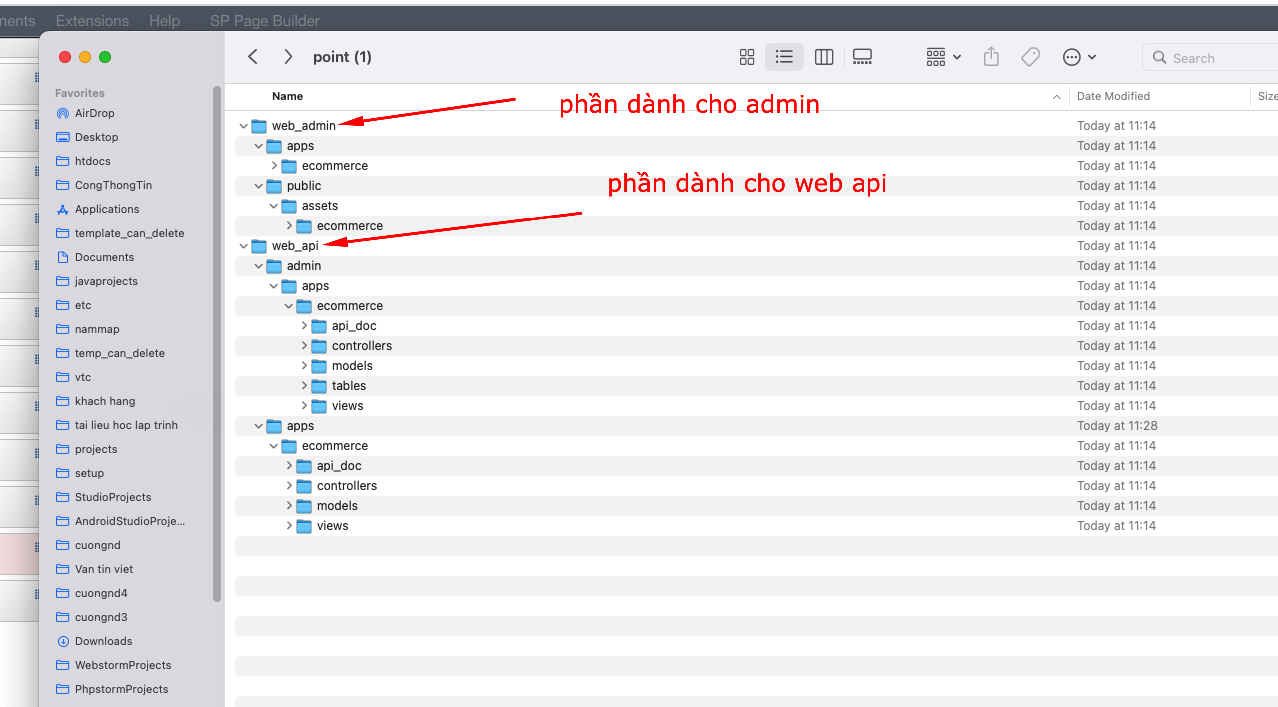
Tại đây bạn có thể tạo bất kỳ view gì, sau đó nhấn nút tải về là ok, sau khi các bạn tải về bạn mở ra bạn sẽ quan sát thấy là toàn bộ các file mà bạn cần tạo bằng tay thì ở đây đều có sẵn cả bạn chỉ việc copy vào project của bạn rồi điều chỉnh lại nội dung sao cho phù hợp là được
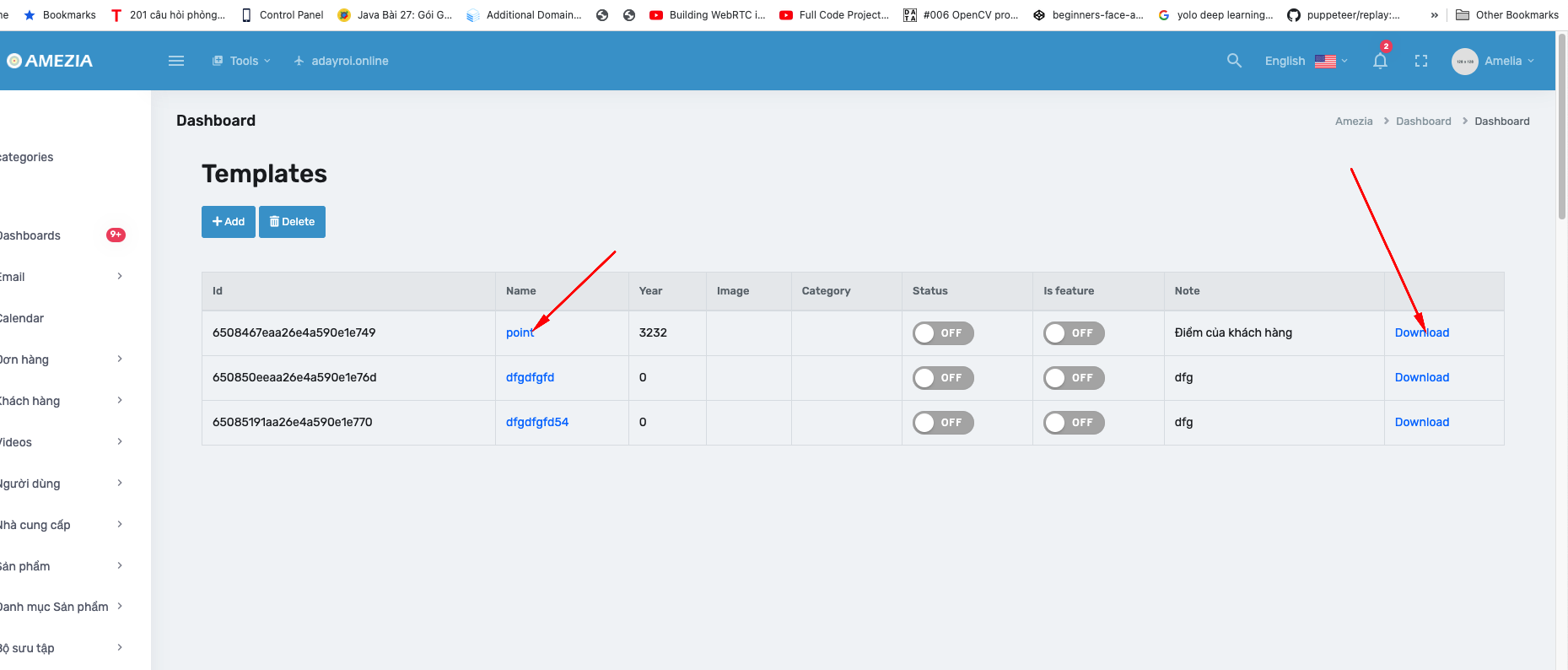
Chú ý là nó sẽ có 2 phần như mô tả trong hình ảnh hãy copy những phần tương ứng vào project của mình
Để tạo một view mới bạn chọn nút "add"
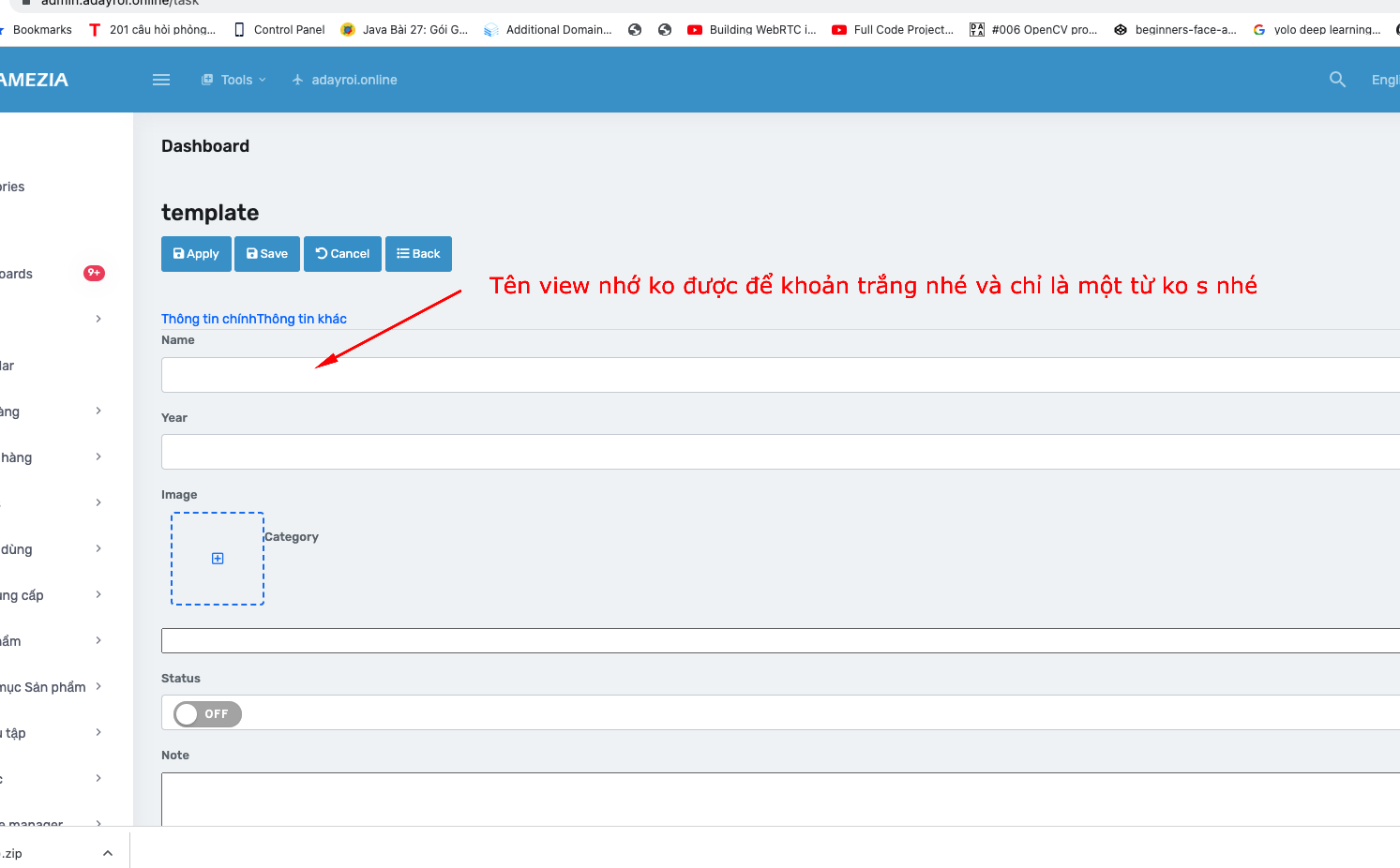
Hoàn thành
Như vậy sau khi bạn xây dựng xong thì chúng ta đã có phần backend quản lý car, tương tự như vậy chúng ta có thể làm các phần quản lý khác
Ghi chú
Cảm ơn bạn đã đọc
Tài liệu được cập nhật thường xuyên. Mọi góp ý xin gửi về đội ngũ Softway.